
Seedance 2.5 video cost is easier to budget when you start with the ad you need. For a 15-second product ad made from three five-second shots, reserving three attempts per shot means nine generations. At Veemo’s checked 480p estimate of 110 credits per five-second generation without video input, that is 990 credits. The USD Standard monthly plan displayed on October 14, 2026 includes 998 credits for US$49.90 per month; the one-time Creator Pack includes 1466 credits for US$89.90. These are purchase examples covering that allowance, not a guarantee that nine attempts produce a finished ad.
This guide helps you choose a credit budget, understand the cash needed to buy capacity, and decide when another attempt is worth paying for. The examples use current public Veemo quotes and USD plan prices. They do not include editing labor, licensed music, or a promise of a usable result. Your existing balance and the quote shown before submission determine what you need to purchase.
1. What does one generation cost in Veemo credits?
The checked creation form offers 480p and 720p, with durations from four to thirty seconds. For a new shot without input video, its displayed estimates are 22 credits per output second at 480p and 47 at 720p. We checked five-, ten-, and fifteen-second settings in the live public form on October 14 without submitting a paid generation.
| Requested duration | 480p, no input video | 720p, no input video |
|---|---|---|
| 5 seconds | 110 credits | 235 credits |
| 10 seconds | 220 credits | 470 credits |
| 15 seconds | 330 credits | 705 credits |
For Seedance 2.5 video cost, choose the row that describes the footage you are requesting, not the duration of your edited advertisement. Three separate five-second generations request fifteen seconds in total. If you repeat each shot three times, you request forty-five seconds, even though the finished edit may still be fifteen seconds.
The current configured estimates with video input are 14 credits per output second at 480p and 29 at 720p. That makes a fifteen-second request 210 or 435 credits respectively. Those reference-input figures were reproduced from Veemo’s current calculator, rather than checked through a paid or uploaded-reference task. Check the actual form quote for your uploaded inputs; do not add an irrelevant video merely to seek a lower displayed category.
Use the displayed quote before every submission as the amount to budget for that attempt. Rates and server pricing can change. A successful generation still needs your creative review; finishing a task does not establish that the product, hands, text, and motion are suitable for your ad.
2. Plan a 15-second ad as three reviewable shots
Consider a simple bottle advertisement: five seconds to introduce the product, five seconds to demonstrate one real action, and five seconds for a clean product view. Add your approved claim and call to action in the edit. This is an illustrative production brief, not a Seedance output or a tested prompt.
Before generating, prepare a clear product photograph and identify the details that must remain accurate: cap shape, label position, color, and how the product is used. Choose one camera direction for each shot. A demonstration should show an action the product can actually perform. These decisions give you something concrete to accept or reject when the result arrives.
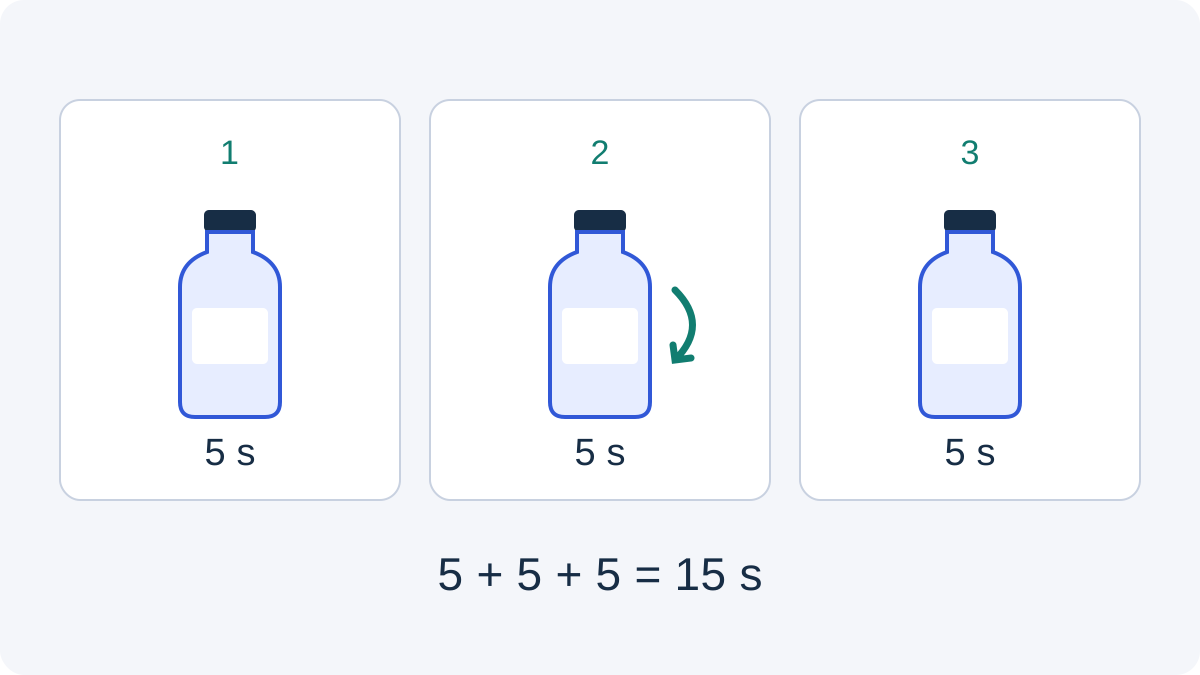
Splitting the brief can make a rejected shot easier to replace: you can retry the demonstration while keeping an approved opening. It also creates separate continuity and editing work. A single fifteen-second generation may suit a continuous action better. Neither approach guarantees a lower Seedance 2.5 video cost; the saving depends on which footage you accept and what needs to be repeated.
Decide whether a shot needs generation at all. If you already have an approved closing photograph, an editor may be able to use it with a simple transition instead of generating another scene. This guide’s three-shot budgets assume all three shots are generated; using existing material changes the number of paid attempts.
3. Set your Seedance 2.5 video cost limit before you start
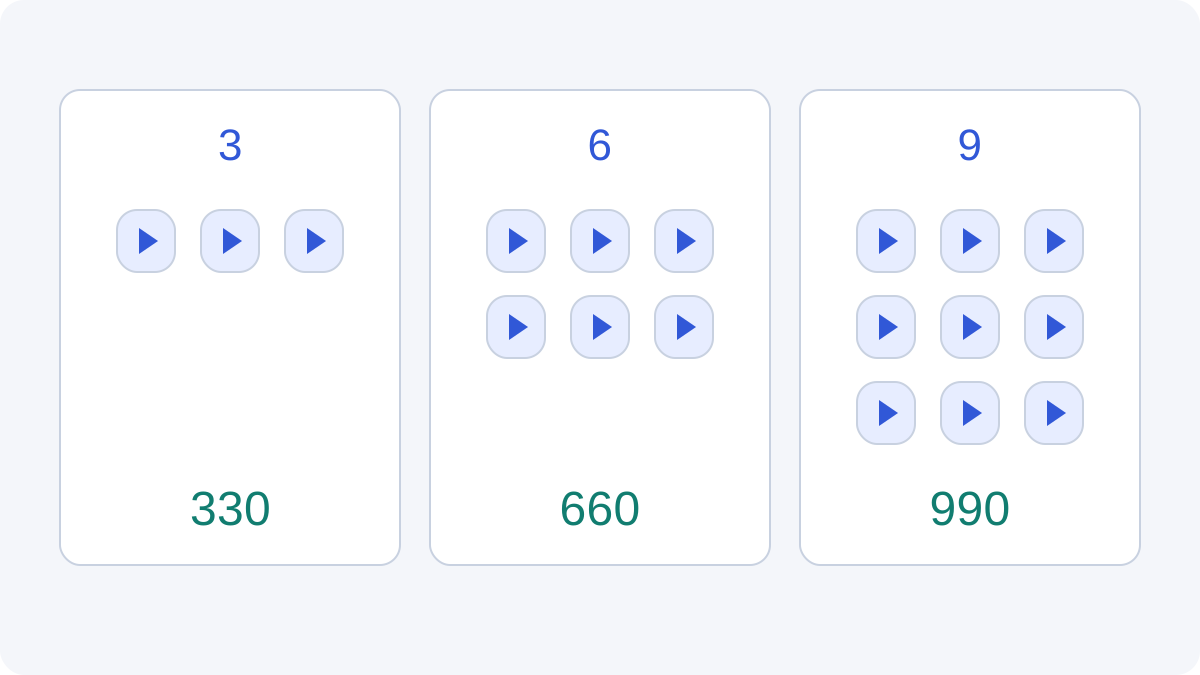
Here is the same fifteen-second edit at different attempt allowances. Each attempt is a fresh five-second shot without input video. The table counts spending capacity, not observed acceptance rates. “Three attempts per shot” means you allow at most nine generations; it does not mean the third result will be good.
| Allowance for each of 3 shots | Total generations | 480p credit budget | 720p credit budget |
|---|---|---|---|
| 1 attempt | 3 | 330 | 705 |
| 2 attempts | 6 | 660 | 1410 |
| 3 attempts | 9 | 990 | 2115 |
| 4 attempts | 12 | 1320 | 2820 |
For an unfamiliar product shot, treat the first attempt as a decision point. Review the important action before repeating it. If the cap or label changes, revise the reference or simplify the action. If the composition works but the motion does not, change the motion instruction rather than changing everything at once.
Your Seedance 2.5 video cost limit should have a clear stop rule. For example, review a shot after its second rejected attempt before authorizing another. Two is an example of a team rule, not a universal optimum. The purpose is to avoid paying repeatedly for the same unresolved brief.
Record what each rejected attempt taught you. “Wrong product” calls for a different response from “opening too slow.” A useful next attempt answers a specific question. If you cannot say what you are changing, pause the generation and spend time on the brief instead.
4. Turn your Seedance 2.5 video cost budget into a purchase
A credit budget and a checkout payment are different amounts. A 990-credit project does not create a separate 990-credit purchase option. Compare your available balance with the current packages, then buy only the capacity your plan requires. The following USD prices were observed on Veemo’s public pricing page on October 14.
| Purchase option | Displayed USD price | Included credits |
|---|---|---|
| Basic monthly | US$29.90 / month | 598 |
| Standard monthly | US$49.90 / month | 998 |
| Pro monthly | US$99.90 / month | 1998 |
| Starter Pack, one-time | US$39.90 | 614 |
| Creator Pack, one-time | US$89.90 | 1466 |
| Professional Pack, one-time | US$199.90 | 3444 |
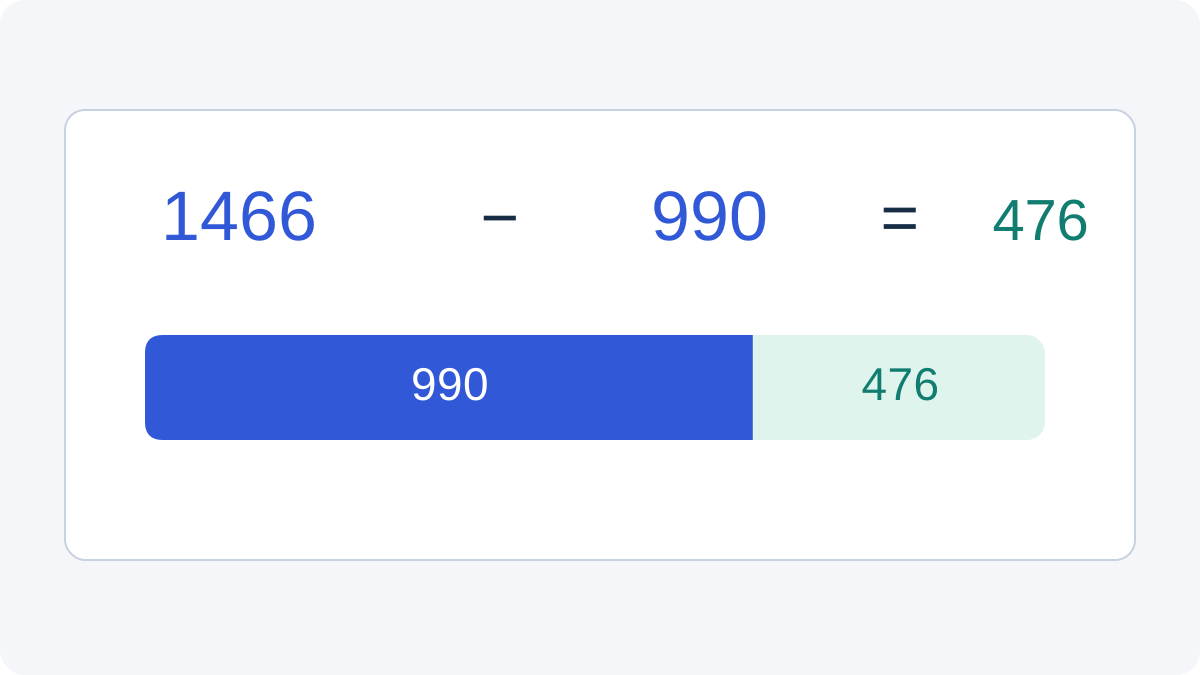
For the 990-credit example and a zero starting balance, Basic monthly and Starter Pack alone are too small. Standard monthly covers the allowance and leaves 8 credits. Creator Pack covers it and leaves 476 credits. The corresponding checkout examples are US$49.90 for a monthly subscription or US$89.90 for a one-time pack, rather than a universal dollar price for producing one ad.
The public pricing page says subscription credits refresh every billing cycle and one-time pack credits do not expire. Check the current renewal and credit terms before choosing. A monthly subscription can fit regular creation; a one-time pack may fit occasional work without the same billing commitment. Your future usage matters as well as this one project.
At 720p, a two-attempt allowance for each shot is 1410 credits. Creator Pack’s 1466 covers that example and leaves 56 credits; Pro monthly’s 1998 also covers it and leaves 588. These are two single-purchase examples, not a claim about the cheapest possible combination, promotion, or account-specific offer. Existing credits can reduce the additional capacity you need.
For Seedance 2.5 video cost, compare the total purchase with the work you expect to use. Do not multiply a promotional “videos per month” headline by your desired duration. Model, resolution, and inputs determine credits per request, so an advertised generic video count is not a Seedance 2.5 attempt allowance.
5. When is 720p worth the larger allowance?
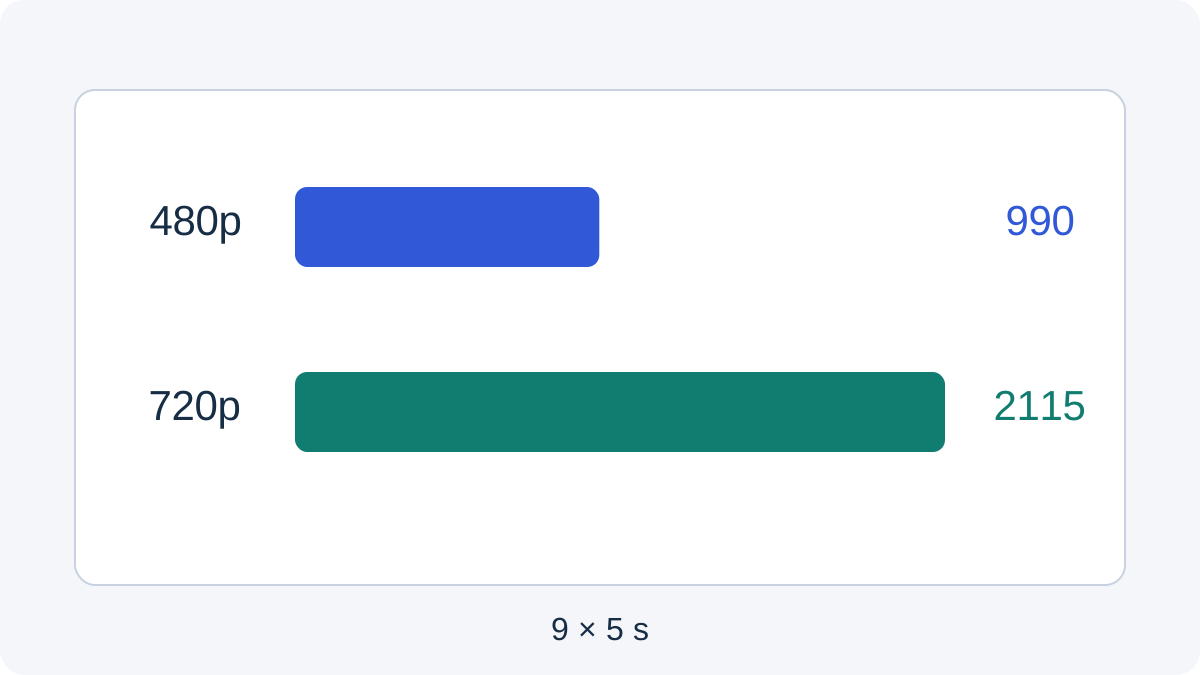
At the checked no-video-input rates, the nine-attempt example rises from 990 credits at 480p to 2115 at 720p. The difference is 1125 credits. That is a useful Seedance 2.5 video cost comparison because the shot count, requested duration, and attempt allowance stay the same.
Use a lower-resolution attempt when it can answer the question you are testing, such as whether the action or camera direction makes sense. Use the delivery setting when you need to inspect details at the size viewers will see. A composition approved at 480p does not prove that small packaging text will be correct in a later generation.
Budget a final-resolution generation as another attempt if that is your workflow. Do not assume that a second generation at 720p reproduces the exact composition of an approved 480p result, or that upscaling is included. If continuity or text is essential, inspect the actual final footage rather than relying on the earlier draft.
A practical mixed budget can separate a motion check from final footage. For instance, three five-second 480p checks cost 330 credits, and three five-second 720p final attempts cost 705: 1035 credits combined. This example allows only one attempt at each stage for each shot. If a final attempt fails your review, you need additional capacity; the mixed workflow is not automatically cheaper than every other approach.
6. Keep the budget tied to a usable ad
Set acceptance criteria before the first generation. For the bottle brief, check the correct product shape, readable required information, believable contact, and a truthful action. Leave critical claims and the final call to action under your control in the edit. Reject attractive footage that misrepresents the product.
Your Seedance 2.5 video cost worksheet needs only a few fields: shot, quote, attempts used, credits spent, and accepted footage. Add editing and asset costs separately. If the nine-attempt 480p allowance is fully spent but one shot is still missing, you do not yet have a completed 990-credit ad.
Review a rough assembly before generating more variations. An individual clip may look acceptable while the three-shot sequence has inconsistent lighting or an awkward transition. Spend the next attempt on a specific gap in the edit. Avoid commissioning extra openings simply because the tool makes it easy to request another version.
For a client project, confirm the deliverables and who authorizes additional spending. A new aspect ratio, revised product packaging, or a different action can require new generations. An agreed attempt allowance makes that conversation concrete without promising unlimited revisions for one fixed generation budget.
7. Use the official demo to make a smaller brief
The official Dreamina Seedance 2.5 launch video shows the vendor’s presentation of the model. Its publicly accessible embedding was verified. It is not evidence that Veemo users receive the same result or can reproduce a montage within a particular number of attempts.
Watch for one action that resembles your own requirement: a product reveal, a controlled camera movement, or a short demonstration. Turn that action into a five-second brief with a clear acceptance check. The clip you need is usually much narrower than the full demonstration. That narrower brief helps you decide what to request, what to review, and what another attempt would improve.
Do not use the demo to predict your Seedance 2.5 video cost. It does not disclose the attempt count, reference preparation, selection, or editing behind each presented result. Your budget should follow the quote and the attempts you authorize, while your quality decision follows the footage you actually receive.
8. Questions before you pay
Is 990 credits a guaranteed price for a fifteen-second ad?
No. It is an allowance for nine five-second 480p generations without video input. A usable fifteen-second edit may require fewer or more attempts. Seedance 2.5 video cost depends on the work you request and repeat, not just the final timeline length.
Can I make the same ad with one fifteen-second request?
A fifteen-second fresh request is quoted at 330 credits for 480p or 705 for 720p in the checked form. It might suit a continuous action. If the result needs replacing, however, you may repeat a longer request. Choose the structure that suits the shot and your review process.
Does the cheapest monthly plan cover the example?
Basic monthly includes 598 credits in the checked USD offer, so it does not cover the 990-credit allowance by itself. Standard monthly includes 998. Consider your existing balance and the recurring billing terms before buying; these examples assume no starting credits.
Should I add a reference video to reduce credits?
Use a reference video when it communicates the motion or existing footage you need. The quoted category can differ, but an irrelevant reference may create more rejected work. For editing or continuation, see the existing-footage guide and product-demo continuation guide; both describe different creative tasks.
Are editing, music, and asset rights included?
The credit tables cover generation estimates only. Budget editing and licensed assets separately, and check the applicable service terms and permissions for your project. Paying for generation does not settle every reference, likeness, soundtrack, or product claim.
What should I check immediately before submitting?
Confirm the selected model and inputs, duration, resolution, displayed credits, and available balance. Recheck current Veemo plans if you need more capacity. This keeps your Seedance 2.5 video cost decision tied to the request you are about to make.
9. Choose your next step
If you need a small fifteen-second product ad, start with a three-shot brief and a deliberate attempt allowance. The 990-credit 480p example gives you a concrete planning baseline; it is not a promise of nine successful results. Choose 720p or a larger allowance only when the production requirement justifies it.
For regular work, compare the monthly options against your expected total usage. For an occasional project, compare one-time packs and the balance you can reuse later. Then check the selected settings and quote in Veemo before authorizing a task. That is the useful purpose of a Seedance 2.5 video cost budget: knowing what you are paying to attempt, what you will accept, and when to stop.
Prices and method: USD plan prices and six no-video-input form quotes were checked on October 14, 2026; reference-input figures were reproduced from the current calculator. All production allowances are illustrative arithmetic. No paid generation or acceptance-rate test was performed. Diagrams are original planning aids; the editorial cover is not a model output. Recheck prices and the displayed quote before purchase.