Gemini Omni Flash vs Seedance 2.0 is less a contest between two interchangeable video generators than a choice between two production philosophies. Seedance 2.0 is the stronger starting point when you want to assemble a new clip from text, images, audio, and video references, especially when motion, multi-shot direction, and synchronized sound matter. Gemini Omni Flash is more compelling when your priority is conversational creation and editing: generate or bring in a scene, describe a focused change, and keep refining it over multiple turns.
That is the short answer. The useful answer depends on your source material, output length, editing pattern, access route, and tolerance for a preview model. This guide compares the official specifications and practical workflows available on July 14, 2026. It does not claim that Veemo AI ran a controlled Gemini Omni benchmark. Where a conclusion comes from vendor documentation or a third-party demonstration, we label it clearly.
Gemini Omni Flash vs Seedance 2.0: quick decision table
| Decision | Start with | Reason |
|---|---|---|
| Create a new, high-motion scene from several reference types | Seedance 2.0 | ByteDance documents combined text, image, audio, and video inputs plus generation, extension, and editing. |
| Revise a generated scene through several natural-language turns | Gemini Omni Flash | Google designed the Interactions API workflow around conversational edits that build on previous interactions. |
| Generate a clip longer than 10 seconds in one pass | Seedance 2.0 | The official launch describes output up to 15 seconds; Gemini's current developer preview documents 3–10 seconds. |
| Use an audio file as an API reference today | Seedance 2.0 | ByteDance lists audio references. Google's current Gemini API documentation says uploaded audio references are not supported in this preview. |
| Create a knowledge-grounded visual explainer | Evaluate Gemini Omni Flash | Google positions world knowledge and intuitive physics as central parts of the Omni workflow. |
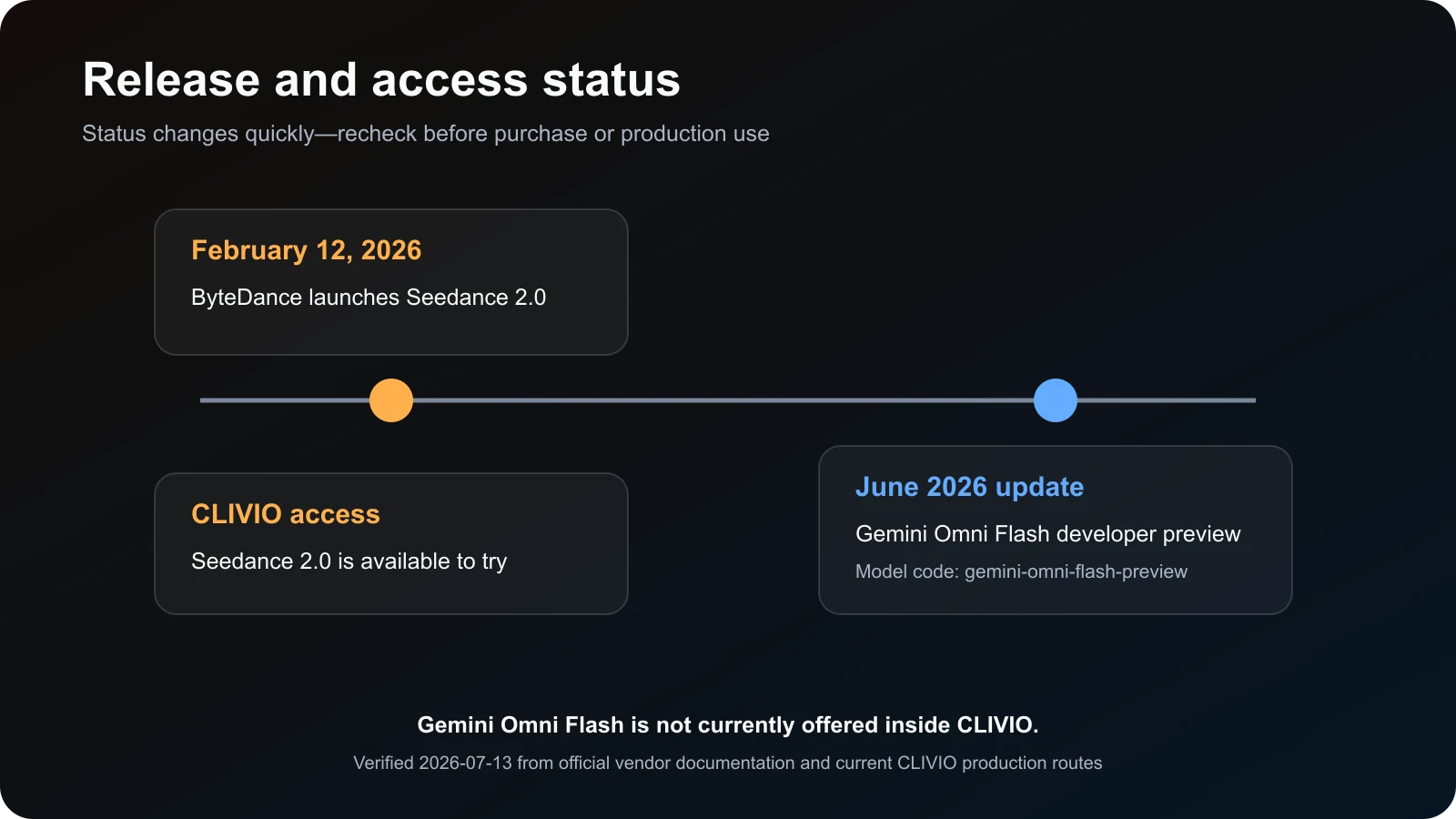
| Generate inside Veemo now | Seedance 2.0 | Veemo currently offers a live Seedance 2.0 workflow. Gemini Omni Flash is not offered inside Veemo. |
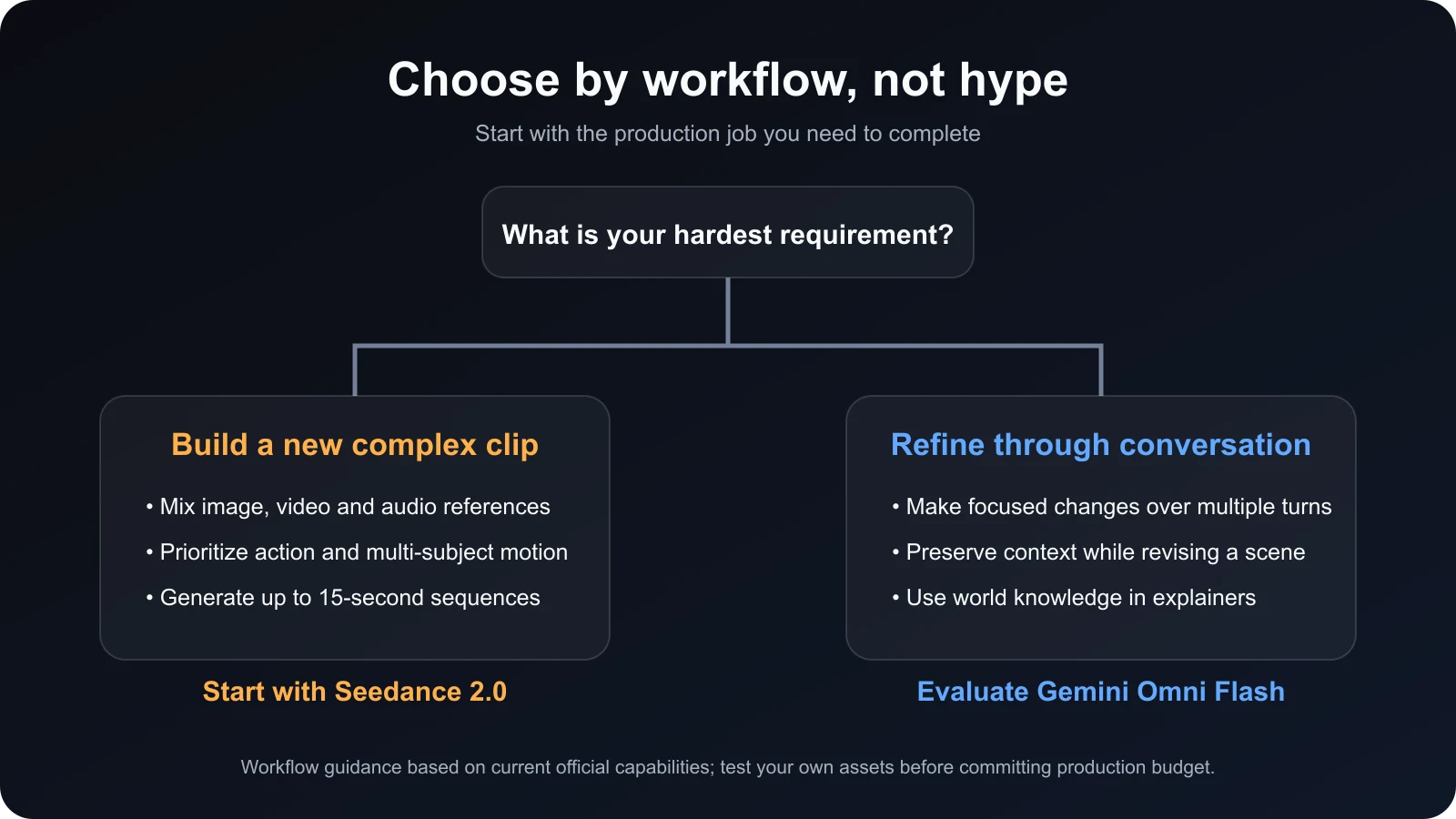
Practical verdict: choose a workflow before choosing a brand. For an ad team building a new product clip from a packshot, music bed, storyboard, and motion reference, Seedance 2.0 is the more direct fit. For a creator who expects to say “remove the phone, keep everything else the same, then move the camera over the shoulder,” Gemini Omni Flash deserves evaluation. Neither choice eliminates the need to test your own source assets.
The Gemini Omni Flash vs Seedance 2.0 decision therefore starts with one question: is your bottleneck constructing a complex new clip or preserving context through a chain of revisions?
What this comparison measures—and what it does not
A credible Gemini Omni Flash vs Seedance 2.0 comparison must separate documented capability from observed output. Official documentation can answer questions such as supported inputs, maximum duration, API model code, aspect ratios, and whether conversational state is available. It cannot prove that one model consistently produces better hands, motion, dialogue, or brand-safe footage across every prompt.
For that reason, this article uses three evidence layers:
- Primary documentation. The ByteDance launch article, Seedance 2.0 product page, Gemini Omni Flash API guide, and Google's Gemini Omni announcement.
- Current Veemo product state. Seedance 2.0 is available through Veemo's production route and generation forms. Gemini Omni Flash is discussed as an external market model, not presented as a Veemo feature.
- Third-party observation. An independent creator video is embedded later to show one person's workflow and examples. Its judgments are useful context, not a controlled Veemo score.
We also avoid using a single viral clip as a benchmark. AI video output varies by prompt wording, seed, safety filtering, source media, account tier, and provider implementation. A fair purchase decision should be based on repeated attempts and the cost per accepted clip, not the prettiest example posted online.
This evidence boundary keeps the Gemini Omni Flash vs Seedance 2.0 analysis useful without turning launch claims into invented laboratory results.
Seedance 2.0: reference-rich generation and longer directed clips
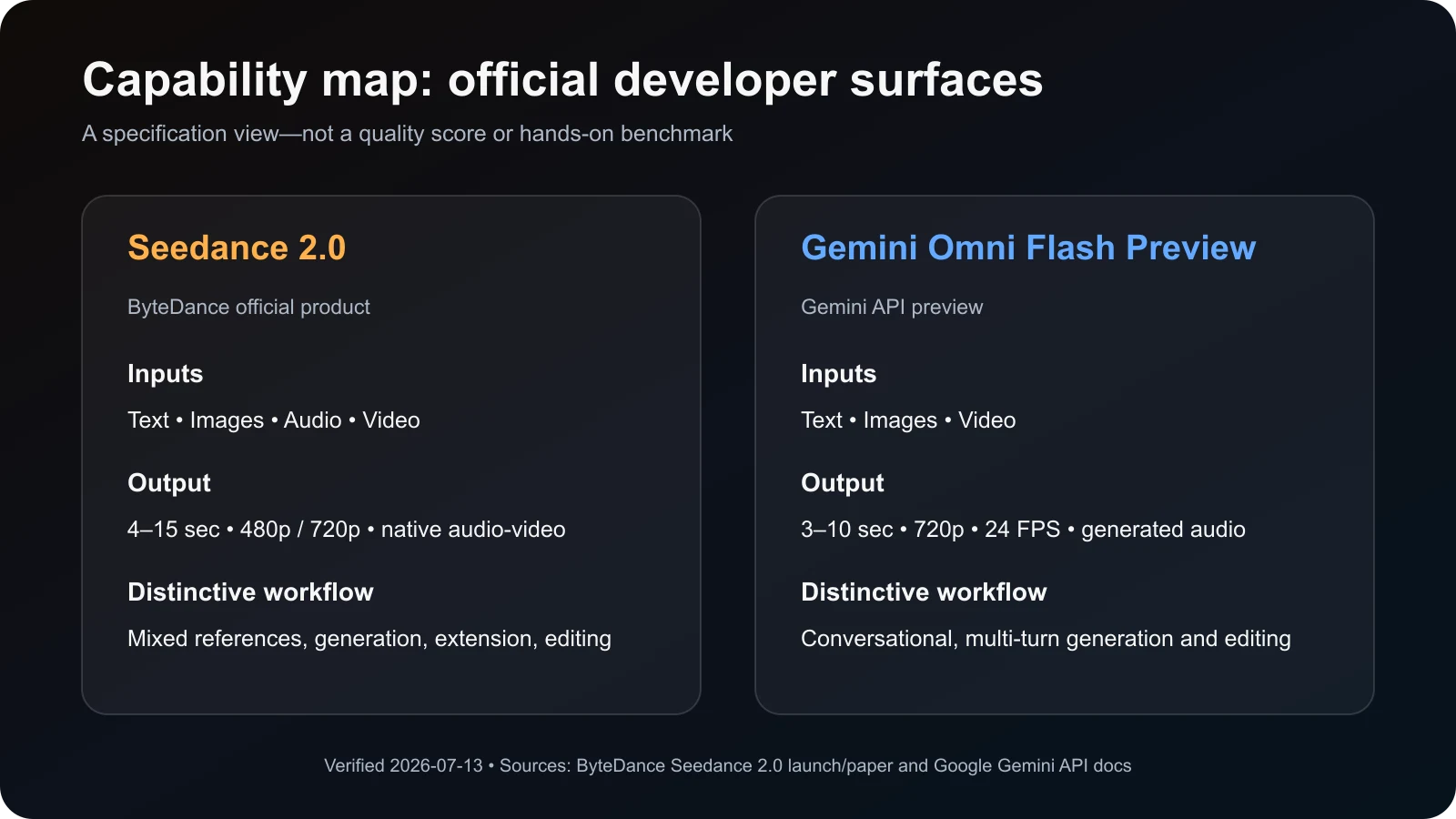
ByteDance launched Seedance 2.0 on February 12, 2026 as a unified audio-video model. Its central production idea is that text, images, audio, and video should be usable together rather than handled as isolated steps. The official announcement says a request can combine up to nine images, three video clips, three audio clips, and natural-language instructions. It also describes high-quality multi-shot output up to 15 seconds with stereo audio.
Those details matter for real creative work. A product marketer rarely starts from text alone. The team may already have a packshot, a desired camera move, a licensed soundtrack, a reference for pacing, and a storyboard frame. Seedance 2.0 is designed around that mixed-reference situation. Instead of asking one model to invent every decision, you can give it more of the decisions you have already made.
Where Seedance 2.0 fits best
- Action and interaction. ByteDance highlights complex motion, multi-subject contact, sports, and performance as improvement areas. Treat these as vendor claims until your own repeated tests confirm them.
- Multi-shot ad concepts. A 15-second ceiling is useful for a hook, product reveal, benefit beat, and closing frame without stitching several tiny generations.
- Audio-led creative. Music, ambient sound, dialogue, and motion can be planned as one audiovisual result rather than assembled only after generation.
- Reference-to-video work. Images, clips, and audio can carry composition, motion, camera, effects, rhythm, or identity cues into a new result.
- Extension and modification. The model is positioned for more than greenfield text-to-video, including extending or changing existing footage.
The practical limitation is complexity. More reference slots do not automatically produce more control. Conflicting inputs can create ambiguity: one image suggests a wide lens, a motion clip suggests a close handheld move, and the audio implies a different pace. Good Seedance prompts assign a role to every input and state which attributes must remain fixed.
In a Gemini Omni Flash vs Seedance 2.0 production plan, this makes Seedance the reference-composition option rather than simply the “more inputs” option.
Gemini Omni Flash: conversational video creation and editing
Google introduced Gemini Omni as a family that combines Gemini reasoning with generation, starting with video. The first model is Gemini Omni Flash. In the developer API it is currently a preview with model code gemini-omni-flash-preview. Google's model page documents text, image, and video input, 3–10 second video output at 720p and 24 FPS, and a context window designed to support rich multimodal interactions.
The differentiator is not simply “Google can generate video.” The important feature is the interaction model. Through the Interactions API, a creator can generate a scene, pass the previous interaction ID, request a change, and continue. Google recommends focused edit instructions such as changing one object or lighting condition while explicitly asking the model to keep everything else the same.
Where Gemini Omni Flash fits best
- Iterative correction. Conversational state is valuable when the first result is close and you want targeted revisions rather than a total reroll.
- Transformative edits. Google demonstrates changing materials, environments, objects, camera angles, and style through natural language.
- Knowledge-led explainers. Google emphasizes world knowledge and intuitive physical reasoning, which may help scientific, historical, or educational concepts.
- Timing instructions. The prompt guide supports natural-language timing and timecode-like segments for events and cuts.
- Readable scene text. Google explicitly documents prompting for words that appear in the video, although any production use still requires visual review.
Preview status is a real operational consideration. Preview models can change, carry tighter rate limits, or be deprecated on a shorter schedule than stable releases. The current Gemini API also lists limitations: uploaded audio references are unsupported, uploaded video references have constraints, and some editing features vary by region. Check the official page on the day you budget a campaign.
For teams comparing Gemini Omni Flash vs Seedance 2.0, conversational state is Omni Flash's clearest differentiator, while preview volatility is its clearest planning risk.
Gemini Omni Flash vs Seedance 2.0 by production category
1. Starting from text
Both models can create video from a text description. Seedance 2.0 gives you a longer documented ceiling and is positioned around directed, multi-shot audiovisual generation. Gemini Omni Flash brings conversational follow-up: the first prompt can be the beginning of the process rather than a one-shot specification. If you usually rewrite a giant prompt and regenerate from zero, Gemini's stateful interaction may reduce friction. If you need a longer new sequence with synchronized audio and several planned beats, Seedance may be the more natural first attempt.
2. Working with multiple references
This is a clear structural difference in the current Gemini Omni Flash vs Seedance 2.0 documentation. Seedance 2.0 explicitly promotes simultaneous image, video, and audio references in substantial quantities. Google describes Gemini Omni as able to combine multimodal inputs at the product-family level, but the present developer preview says audio reference upload is unsupported. Compare the exact surface you will use, not the broadest launch promise.
3. Editing an existing result
Gemini Omni Flash has the more distinctive interaction design. Its editing workflow encourages small, conversational changes with preserved context. Seedance 2.0 also supports editing and extension, and its reference system can make it powerful for larger transformations. The difference is how you direct the work: Gemini feels like a revision conversation; Seedance feels like a reference-and-instruction composition. Teams should test which mental model produces fewer unintended changes.
The Gemini Omni Flash vs Seedance 2.0 editing choice is therefore about revision granularity, not whether either model can edit at all.
4. Motion, action, and multi-character scenes
ByteDance makes strong claims about physical accuracy and complex interactions, and its launch examples focus on sports, dance, and contact-heavy scenes. Google emphasizes intuitive physics, world knowledge, and coherent editing. Those claims overlap but are not directly comparable vendor benchmarks. For action, run at least three generations per model with the same choreography, then score contact, limb integrity, identity drift, camera continuity, and whether important motion happens inside the frame.
5. Audio and dialogue
Both systems generate video with audio. Seedance 2.0's official story centers on unified audio-video generation and accepts audio references. Gemini Omni Flash generates an audio track, but the developer documentation warns that uploaded audio references are not currently supported. If your job starts from a specific licensed track, voice reference, or beat map, that distinction can determine the entire workflow. Regardless of model, review dialogue accuracy, lip movement, unwanted music, sound-event timing, and whether the export needs replacement audio.
Audio-reference requirements can settle a Gemini Omni Flash vs Seedance 2.0 shortlist before visual testing even begins.
6. Duration, resolution, and formats
The Seedance 2.0 paper describes native 480p and 720p output from 4 to 15 seconds. Google's model page documents 720p, 24 FPS, and 3–10 seconds for Gemini Omni Flash Preview, with 16:9 and 9:16 documented in the API guide. Provider wrappers may offer additional upscaling or settings, but those should not be confused with native model output. For a fair comparison, export the same aspect ratio and compare at the same delivery resolution.
7. Access and production stability
Seedance 2.0 is available through Veemo today, so Veemo users can test it in the same workspace as other supported tools. Gemini Omni Flash is accessible through Google's products and developer preview, but not through Veemo. Its preview label means teams should plan for API changes and revalidate limits before launch. For a production pipeline, access reliability, queue time, regional rules, and support can matter as much as visual quality.
How to run your own fair comparison
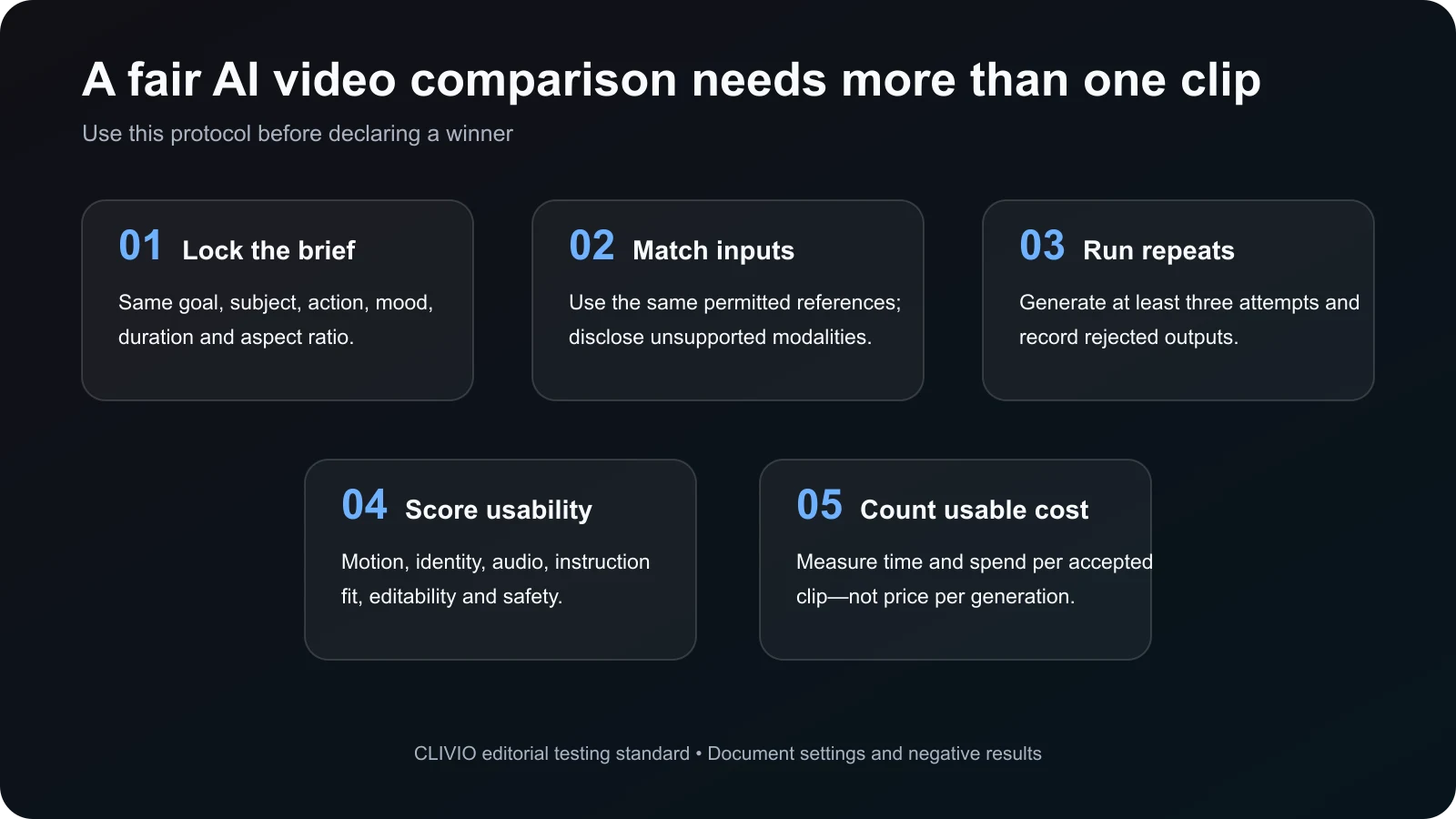
A serious Gemini Omni Flash vs Seedance 2.0 test begins with a production brief, not a beauty prompt. Define what makes a clip acceptable before generating anything. For a product ad, that might mean: the bottle shape remains correct, the hand has no visible defect, the logo is readable or intentionally excluded, the camera completes one orbit, the splash lands on beat, and the result is usable in a 9:16 placement.
- Lock the brief. Use the same subject, action, duration target, aspect ratio, lighting, mood, and audio requirement.
- Match references where possible. Give both models the same permissible images or clips. When one model cannot accept a modality, disclose the mismatch instead of pretending the test is controlled.
- Run at least three attempts. Record every output, including safety blocks and failures. A single lucky seed says little about expected production cost.
- Score usable criteria. Evaluate prompt fit, motion, identity, audio sync, text, editability, safety, and the amount of post-production required.
- Calculate cost per accepted clip. Include rejected generations, upscale fees, editing time, queue delay, and manual cleanup.
Do not silently improve one model's prompt after seeing its weaknesses. If a prompt needs model-specific syntax, document the change and explain why it was necessary. Save prompts, settings, source files, generation timestamps, and output hashes so a later update can be compared against the same baseline.
A documented Gemini Omni Flash vs Seedance 2.0 test can be rerun after either model changes; an undocumented showcase cannot.
Prompt templates for each workflow
Seedance 2.0 product-ad brief
[0–3s] Macro close-up of an unbranded glass skincare bottle on wet black stone. A narrow warm rim light reveals condensation.
[3–8s] One continuous clockwise camera orbit. Water droplets rise in slow motion and form a clean circular halo around the bottle. Preserve the bottle silhouette and label area.
[8–12s] The halo falls as a controlled splash on the beat. Camera settles into a centered hero frame.
Audio: restrained glass taps, water detail, low cinematic pulse. No dialogue.
Constraints: no extra products, no distorted cap, no unreadable text, no scene cuts.
This format assigns timing, camera, sound, and preservation constraints. If you attach references, state the role of each one: “Image 1 controls product shape; Video 1 controls only camera motion; Audio 1 controls rhythm.”
Gemini Omni Flash editing sequence
Turn 1: Create a 9:16 studio product shot of an unbranded glass skincare bottle on wet black stone. One slow clockwise camera orbit. Restrained ambient audio. No dialogue.
Turn 2: Add a ring of water droplets that rises around the bottle. Keep the bottle, camera path, lighting, and audio unchanged.
Turn 3: Make the droplets fall on the final beat and end on a centered hero frame. Keep everything else the same.
The smaller edit requests follow Google's current guidance: describe the specific change and repeat the invariants. This does not guarantee preservation, but it makes unintended rewrites easier to diagnose than a complete prompt replacement.
These paired templates turn Gemini Omni Flash vs Seedance 2.0 from an abstract feature debate into two workflows aimed at the same deliverable.
Independent video walkthrough
Creative Pad Media's walkthrough shows how the creator accessed Gemini Omni through Google surfaces, demonstrates iterative edits, and compares several examples with Seedance 2.0. The most useful part is the workflow visibility: you can see how short edit instructions produce changes and where a generated result may drift. The creator gives a strong preference in some categories, but that preference should be treated as one tester's observation. The account tier, prompt adaptation, number of attempts, and rejection rate are not a substitute for your own controlled production test.
Suggested viewing points: the opening explains the intended editing role; the middle covers access and Flow/Gemini differences; later examples compare simple physical changes and more difficult human scenes. Even if you skip the video, the decision framework and specifications in this article stand on their own.
Pricing, rights, safety, and provenance
Pricing is deliberately not reduced to a single dollar figure here. Gemini Omni Flash is a preview exposed across subscription products and developer surfaces, while Seedance 2.0 pricing varies by first-party or partner access route. Credit values from unrelated providers are not directly comparable. Before purchase, record the current plan, resolution, duration, failed-generation policy, watermark behavior, and whether editing consumes a new generation.
Commercial use also depends on the terms of the platform through which you generate, not only the model name. Review the current provider agreement and your source-media licenses. Do not upload music, footage, faces, trademarks, or characters you lack permission to use. In the United States, AI output can create copyright, publicity, trademark, and contractual questions even when a tool permits commercial use. This section is general information, not legal advice.
No Gemini Omni Flash vs Seedance 2.0 verdict overrides the provider terms, source licenses, consent records, or brand-safety rules that apply to your campaign.
Google states that Omni-generated videos include SynthID provenance marking. Seedance safety and watermark behavior may differ by access surface. Keep a rights ledger with prompts, source ownership, consent, model/provider, generation date, edits, and final publication destinations. Brand safety review should happen before a clip reaches paid media.
Final recommendation
For most Veemo users comparing Gemini Omni Flash vs Seedance 2.0, start with the requirement that would be most expensive to fix later. Choose Seedance 2.0 when the job is a new, reference-heavy audiovisual sequence, particularly when you need audio input, action, multi-shot direction, or up to 15 seconds. Evaluate Gemini Omni Flash when the core value is conversational revision, knowledge-grounded creation, or a sequence of focused edits that should preserve previous context.
If you are producing ads, do not make a platform commitment from a launch reel. Run the five-step protocol above on one real brief and count accepted output. The best model is the one that produces the required result safely and repeatedly at the lowest total production cost.
Try Seedance 2.0 in Veemo → Use a real product brief, save every attempt, and judge the workflow against your acceptance criteria.
Frequently asked questions
The following Gemini Omni Flash vs Seedance 2.0 questions cover the limits most likely to affect a buying or production decision.
Is Gemini Omni Flash the same model as Seedance 2.0?
No. Gemini Omni Flash is Google's first Gemini Omni model. Seedance 2.0 is a ByteDance Seed video model. “Seedance Omni” is not the correct combined name.
Which model supports longer videos?
Current official materials describe Seedance 2.0 output up to 15 seconds. Google's developer page documents 3–10 second output for Gemini Omni Flash Preview. Limits can differ by surface and can change.
Can Gemini Omni Flash use an uploaded audio reference?
The current Gemini API guide says uploaded audio references are unsupported in this preview, even though Gemini Omni's broader product vision includes multimodal inputs. Seedance 2.0 officially supports audio references.
Which model is better for video editing?
Gemini Omni Flash offers a distinctive multi-turn conversational workflow for focused changes. Seedance 2.0 also supports modification and extension with rich references. “Better” depends on whether your edit is a small iterative change or a larger reference-driven transformation.
Which model is better for action scenes?
ByteDance emphasizes complex motion and multi-subject interaction, while Google emphasizes physics and contextual editing. Those are vendor positions, not a universal result. Test the same choreography at least three times and score contact, anatomy, framing, and identity consistency.
Can I use both models commercially?
Commercial permissions depend on the current terms of the product or provider you use and the rights in your inputs. Review the applicable agreement and obtain permission for source media, people, brands, music, and characters. Consult qualified counsel for high-risk campaigns.
Is Gemini Omni Flash available in Veemo?
No. As of July 14, 2026, Veemo offers Seedance 2.0 but does not offer Gemini Omni Flash. The Gemini sections in this article describe Google's external product and API.
How often should this comparison be rechecked?
Recheck before every major production decision. Gemini Omni Flash is a preview, and both providers can change limits, access, pricing, safety behavior, or model versions quickly.
Primary sources and verification date
- ByteDance: Seedance 2.0 Official Launch
- ByteDance: Seedance 2.0 product page
- Seedance 2.0 technical paper
- Google AI for Developers: Gemini Omni Flash guide
- Google AI for Developers: Gemini Omni Flash model page
- Google: Introducing Gemini Omni
Specifications and access were reverified on July 14, 2026. Preview details and product availability can change.