Animation used to feel like an exclusive club, a world walled off for artists with years of formal training and access to intimidatingly expensive gear. Thankfully, those walls have come tumbling down. Modern animation software built for beginners is all about being intuitive yet powerful, translating what was once a complex technical process into simple, creative actions anyone can master.
Why Animation Is No Longer Just for Pros
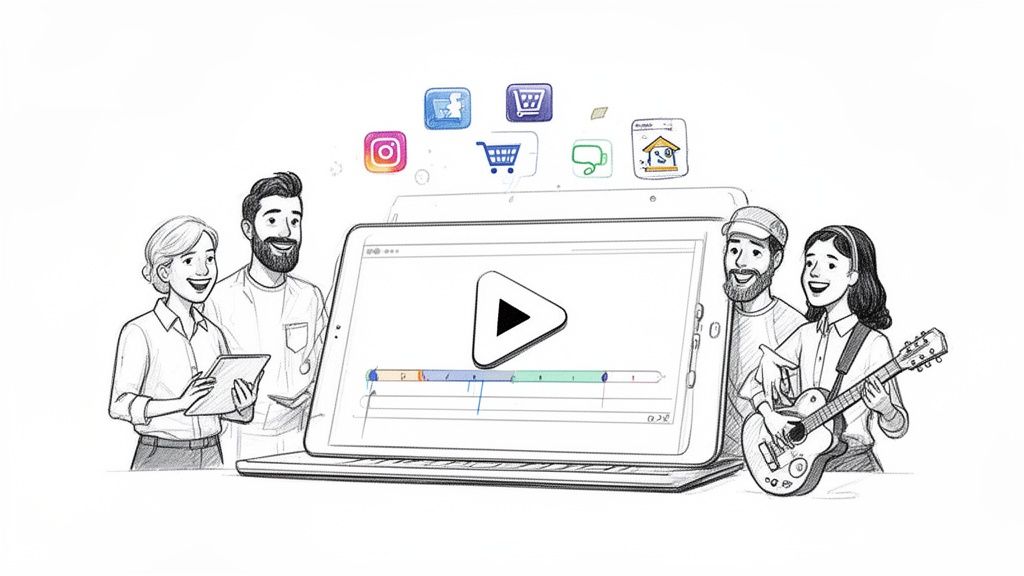
Not so long ago, making even a basic animation meant wrestling with timelines, keyframes, and rendering engines. It was a lot like trying to compose a symphony—you had to understand music theory, know every instrument inside and out, and then conduct the whole orchestra. It was truly an expert’s game.
Now, picture yourself using a digital synthesizer instead. You press a single key and get a rich, complex sound that once required an entire string section. That’s the exact shift we’ve seen in animation. The constant demand for eye-catching video content—for social media, online stores, and classrooms—has pushed developers to create smarter, more straightforward tools.
The New Creative Landscape
This evolution has completely opened up the world of animation, inviting a much wider and more diverse group of creators to the table. You don't need to be a classically trained animator or a software engineer to bring your ideas to life anymore.
This newfound accessibility is a game-changer for:
- Marketers who need to create compelling ads and product videos without breaking the bank.
- Educators looking to build more engaging visual aids for their lessons and online courses.
- Content Creators trying to produce unique, dynamic videos for platforms like TikTok and YouTube.
The industry's explosive growth tells the same story. The global animation software market, estimated at USD 174.98 billion in 2025, is expected to soar to USD 252.18 billion by 2032. This incredible growth is driven by these accessible tools that have dramatically lowered the barrier to entry, empowering everyday users to produce high-quality content. You can dig deeper into these market insights on 360iResearch.com.
The biggest takeaway here is this: your creative vision is now your most important asset, not your technical skill. Modern tools are designed to do the heavy lifting, freeing you up to focus on the story you want to tell.
This new reality has completely changed the playing field. A small business can now create a promotional video that competes with a big brand's, all done in-house. A solo creator can launch an entire animated series right from their laptop. The power to animate is no longer locked away in big-budget studios; it’s available to anyone with a good idea.
Understanding the Building Blocks of Animation
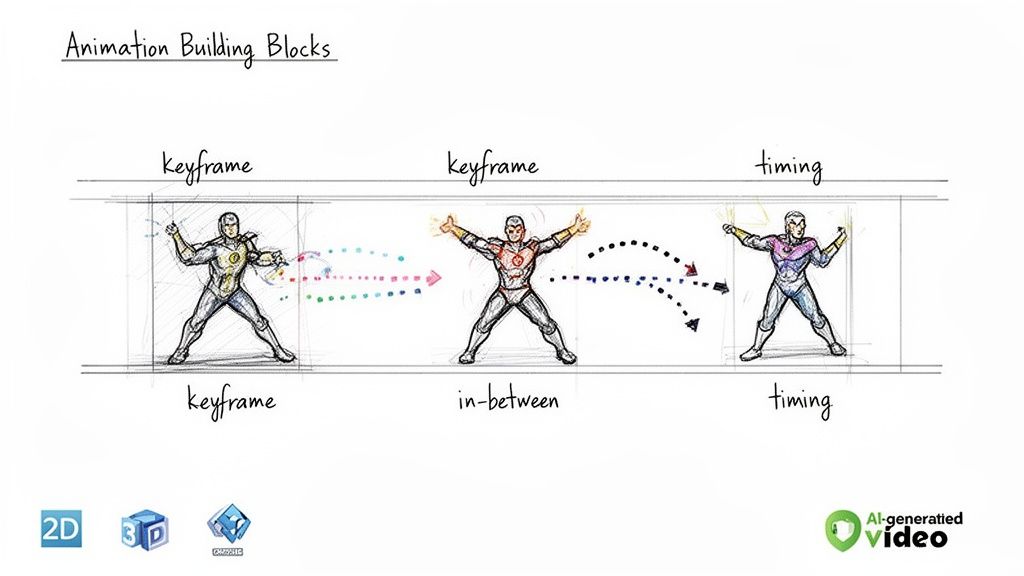
Jumping into animation software can feel like staring at an airplane cockpit for the first time. So many buttons, so many graphs. But don't worry—the core ideas are actually pretty straightforward. Once you get these down, you'll have the confidence to tackle just about any tool out there.
First up is the timeline. Don't let it intimidate you. The best way to think of it is like a recipe for your video. Every element, whether it's a character moving or a title appearing on screen, needs to be added at the right moment and last for the right amount of time. The timeline is simply the canvas where you arrange all these events in sequence.
Next, let's talk about keyframes. This is where the real magic happens. Imagine you're drawing a simple flipbook of a person waving. You wouldn't draw every single frame of the wave, would you? You’d probably just draw the hand at the beginning of the wave and at the very end.
Those two key poses are your keyframes. In animation software, you set these critical moments on your timeline, and the program automatically creates all the frames in between. This process is called "tweening," and it's what saves you from having to hand-draw 24 separate images for every one second of smooth motion. It’s a massive time-saver.
The Different Flavors of Animation
Knowing the main styles of animation will help you pick the right tool for the job. Each one has its own vibe and is better suited for certain projects, which is a big deal when you're exploring animation software for beginners.
2D Animation: This is the classic, flat style you grew up with—think "The Simpsons" or "Looney Tunes." Everything moves on a simple two-dimensional plane (up, down, left, right). It's a fantastic starting point and perfect for things like explainer videos, fun social media content, and motion graphics.
3D Animation: This is where you add depth. Instead of flat characters, you have objects with volume that can move through a three-dimensional world, just like in a Pixar movie. It used to be incredibly complex, but modern tools are opening the doors for beginners to create awesome product demos and more realistic scenes.
AI-Generated Animation: This is the new kid on the block and, by far, the most accessible for newcomers. Forget setting keyframes or worrying about physics. You just type what you want to see—like "a friendly robot waving hello in a futuristic city"—and the AI builds the entire video for you. The technical hurdles practically vanish.
A lot of the newer tools, like Veemo AI, are built entirely around this AI-first way of thinking. They take care of the heavy lifting—the lighting, the movement, the textures—so you can focus on being creative instead of getting bogged down in technical settings.
When you boil it down, understanding timelines, keyframes, and the different animation styles gives you a solid foundation. It helps you see what the software is doing under the hood, so you're not just clicking buttons and hoping for the best. You're actually in control, ready to bring your ideas to life.
What to Look For in Beginner Animation Software
When you're just starting out, picking animation software isn't about finding the program with the most features. It's about finding the one with the right features for a beginner. The goal is to strip away the complexity so you can focus on creating, not getting lost in menus.
Think of it like this: a cluttered workshop is overwhelming. You can’t find what you need. But a clean, organized space lets you get right to work. The best animation software for beginners feels like that clean workspace—it’s intuitive and guides you along, rather than throwing every possible tool at you at once.
One of the biggest helpers is a good template library. Templates are your creative launchpad. Instead of staring at a blank screen, you start with a professional design that you can easily tweak with your own text, colors, and branding. It’s a fantastic way to learn because you get to see how a polished animation is put together from the inside.
The Power of Simplicity
The best tools are the ones that feel invisible. They let you focus on your story and message, not on fighting with confusing settings. This is where modern animation software really nails it for newcomers.
Look for tools that make the whole process feel natural and easy. Key features that really lower the barrier to entry include:
- Drag-and-Drop Editors: This lets you build your scenes visually. If you can make a PowerPoint slide, you can handle this.
- Pre-Built Asset Libraries: Having a ready-to-go collection of characters, props, and backgrounds saves you an enormous amount of time.
- Guided Workflows: Some software is designed to walk you through the process, from setting up your project to exporting the final video.
This focus on accessibility is a huge reason the animation market is booming. Valued at USD 152.77 billion in 2025, the industry is expected to hit USD 230.52 billion by 2035, largely because it's no longer just for the pros. While traditional software can feel intimidating, newer tools are bringing in smart, AI-powered features that let anyone create great-looking content. You can read more about this market growth on Research Nester.
The best feature a beginner can have is one that turns their idea into motion with as little technical struggle as possible. That’s why AI-driven tools are such a big deal.
Prompt-Based Creation Is a Game Changer
Without a doubt, the biggest breakthrough for new animators is prompt-based generation. Platforms like Veemo AI are built around this idea. You just describe the scene you want in plain English, and the AI builds it for you. This completely sidesteps the traditional, painstaking process of manual animation.
Instead of meticulously setting keyframes or tweaking motion curves, you just type something like, "a sleek product rotating on a clean white background." The AI takes care of all the tricky stuff—the lighting, the movement, the rendering—and gives you a professional-looking result in minutes. For a beginner with a great idea but no technical training, it’s the most direct route from concept to creation.
Creating Your First Animation from Start to Finish
Okay, you’ve got the basics down. But theory only gets you so far—the real magic happens when you dive in and actually create something. Let's walk through the entire process together, from a blank canvas to a finished animation.
To make this practical, we'll imagine our project is a simple 15-second animated ad for a social media campaign. It’s a super common task for marketers, creators, and small business owners, so it's a perfect real-world example.
This workflow is pretty universal and applies to most modern animation tools, especially those built with beginners in mind. It gives you a clear roadmap for taking an idea from your head and turning it into a video that’s ready to share.
Step 1: Nailing Down the Idea (and the Prompt)
Every great animation starts with a solid idea. In the old days, this meant drawing out detailed storyboards. With modern AI tools, your idea takes the form of a prompt. Think of the prompt as your creative brief to the AI—the more specific you are, the better the result.
A vague prompt like "show my product" won't get you very far. You need to paint a picture with your words.
Something like this is much better: "A vibrant 3D animation of a sleek, futuristic sneaker rotating slowly on a minimalist pedestal against a soft gray background. Cinematic lighting highlights the shoe's glowing blue accents."
See the difference? That level of detail gives the AI clear instructions on the subject, style, action, and even the mood.
When you're picking a tool to bring this idea to life, your journey will likely follow a path from simple, pre-made templates to more hands-on interfaces and, eventually, powerful AI generators.
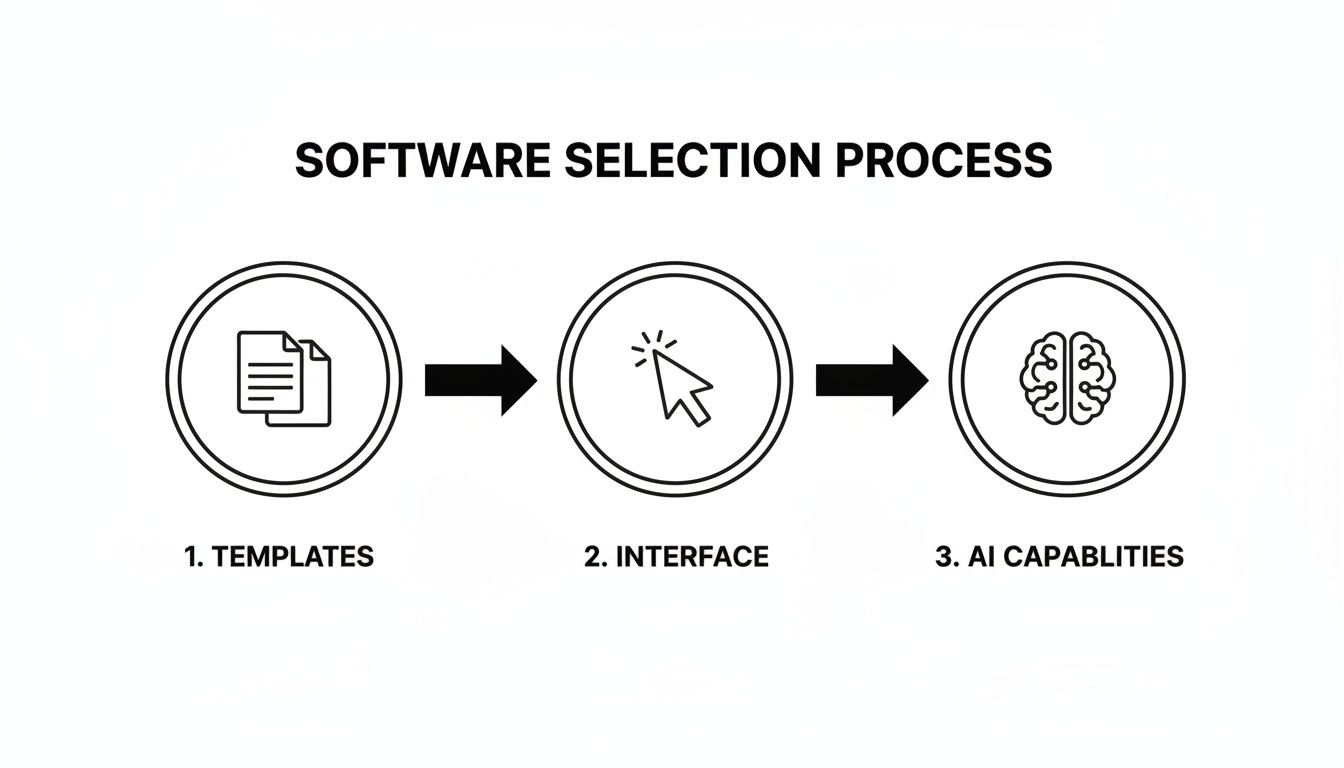
This process shows how beginners naturally progress—starting with easy wins before embracing more creative control with AI.
Step 2: Generation and Basic Settings
With your prompt ready, it’s time to hit "generate" and let the software do the heavy lifting. This is where you’ll dial in the technical specs for your video. Don't worry, good animation software for beginners makes this part incredibly straightforward.
You'll usually only need to tweak a few key settings:
- Aspect Ratio: This is just the shape of your video. You’ll want 9:16 for Instagram Stories or TikTok, 1:1 for a classic Instagram feed post, or 16:9 for something like YouTube.
- Style: This is the fun part. Choose an aesthetic that fits your brand. Are you going for "photorealistic," "cartoon," "anime," or maybe even something tactile like "claymation"?
- Duration: For our little ad project, we'll set this to 15 seconds.
Once those are locked in, you click the button and watch your idea come to life.
Step 3: The Refinement and Polish Phase
The first AI-generated clip is your foundation, but the final touches are what will make your animation truly shine. This is where you add those extra layers of polish that take it from good to great.
Most beginner-friendly tools have a simple built-in editor that lets you easily:
- Add Text Overlays: Drop in a catchy headline, your website, or a clear call-to-action like "Shop Now."
- Incorporate a Soundtrack: Sound is a huge part of the viewing experience. You can upload your own music or, even easier, pick a track from the software’s library of royalty-free audio to set the right mood.
Think of this stage like adding seasoning to a dish. The core ingredients are there, but the final flavor comes from these small, impactful additions.
Step 4: Exporting and Sharing Your Work
You're at the finish line! The final step is to export your masterpiece. This simply means saving your project as a standard video file that you can upload anywhere online.
Most platforms will default to common formats like MP4, which is the universal standard for pretty much every social media site. For quality, choosing 1080p is a safe bet—it looks crisp and clear without creating a massive file that takes forever to upload.
Once it's exported, your 15-second ad is officially ready for Instagram, TikTok, or YouTube. You just created a professional-looking animation in a matter of minutes. Not bad at all.
How AI Is Your New Creative Partner
Think of artificial intelligence less as a robot that replaces you and more as the ultimate creative collaborator. In traditional animation, you wear all the hats—you’re the artist, the director, and the physics engine, responsible for every single frame and every tiny movement. With AI, you get to be the director. You focus on the vision, and your new partner handles the heavy lifting.
Let's take a classic animation exercise: a simple ball bounce. To do this by hand, you'd need to understand timing, gravity, and the "squash-and-stretch" principle to make it look believable. With modern AI, you just describe what you want: "A red rubber ball bounces realistically across a wooden floor." The AI gets it. It understands the physics and generates the scene for you, saving you from hours of painstaking work.
This is a huge deal, especially for beginners who have a great idea but haven't spent years mastering the technical side of things.
Turning Ideas Into Motion Instantly
The real magic of AI in beginner-friendly animation software is how it turns simple text into high-quality, moving visuals. Instead of battling a complex interface full of keyframes and timelines, you can now create incredible content just by describing it in plain language. This cracks the door wide open for creators and marketers who need great results, fast.
Here’s what that looks like in the real world:
- Cinematic Product Videos: A small e-commerce shop can now produce a professional-looking product showcase just by describing the scene in detail.
- Engaging Social Clips: You can take a flat, static product photo and instantly bring it to life as an animated clip that stops people from scrolling.
- Lifelike AI Avatars: A teacher can create an entire tutorial video with a realistic AI avatar without ever stepping in front of a camera.
This ability to go straight from an idea to a finished product used to be reserved for big studios with huge teams and even bigger budgets. Not anymore.
The New Engine of Creative Efficiency
The shift toward simpler animation tools is more than just a trend; you can see it in the market numbers. Motion graphics tools are growing the fastest, with an expected 11.02% CAGR—driven by social media managers and marketers who need quick, eye-catching visuals. An all-in-one platform like Veemo AI is built for this moment, letting anyone generate videos, images, and audio in a few clicks. A small startup can create an AI avatar for their marketing or turn a simple prompt into a physics-aware clip for a comic or promotion. It’s a massive boost in efficiency. You can discover more market insights on SkyQuestt.com.
AI doesn't just make animation easier; it fundamentally changes the creative workflow. It removes technical barriers, speeds up production, and lets your imagination be the only real limit.
Ultimately, AI works like a creative amplifier. It takes care of the "how" so you can finally focus all your energy on the "what." For a beginner animator, there's never been a more powerful tool.
Your First Animation Questions, Answered
Jumping into any new creative skill brings up a ton of questions, and animation is no exception. Let's walk through some of the most common worries new animators have. Getting these answers sorted out will clear the runway for you to start creating.
How Long Does It Take to Learn Animation with Beginner Software?
If you were asking this ten years ago, the answer would be months, if not years. Traditional animation programs are notoriously complex, with steep learning curves packed with technical jargon and confusing workflows.
Thankfully, the new wave of AI-powered animation software for beginners has completely flipped the script. With tools that run on simple text prompts, you can create your first decent-looking animation in a matter of minutes. The whole game shifts from wrestling with software to simply articulating your creative vision. Sure, mastering the art of the perfect prompt takes practice, but you can get surprisingly good results on day one.
Do I Need a Super Expensive Computer?
In the past, the answer was a hard yes. Professional 3D animation was famous for needing beastly computers with top-of-the-line graphics cards and mountains of RAM. This was a huge financial roadblock for a lot of aspiring creators.
Today, that barrier has all but vanished. Many of the most accessible tools, especially the cloud-based AI platforms, don't require any special hardware on your end.
Since all the heavy lifting—the processing and rendering—is done on the company's powerful servers, you can create incredible animations from a standard laptop. All you really need is a stable internet connection.
This single change has done more to democratize animation than almost anything else, opening the doors for anyone to get started, regardless of their budget for gear.
What Are the Most Common Beginner Mistakes?
Your first few projects will be a learning process, but you can avoid some classic rookie mistakes with a bit of planning.
Keep an eye out for these common pitfalls:
- Biting Off More Than You Can Chew: It’s so tempting to want to make your own epic, multi-scene story right out of the gate. A much smarter move is to start with super short, simple projects—think 5-15 seconds long—to get comfortable with the process.
- Forgetting About Sound: Audio is half the experience. Great sound design can make a basic animation feel polished and professional, while silence or bad audio can make even the best visuals feel flat. A simple royalty-free music track can work wonders.
- Getting Lost in "Tool Paralysis": It's surprisingly easy to spend weeks researching dozens of software options instead of just making something. The fastest way to learn is by doing. Pick one tool that seems approachable and dive in.
Can I Use My Animations for My Business?
Absolutely! This is one of the most exciting applications for modern animation tools. But—and this is a big but—you must check the licensing terms of whatever software you're using.
Most established animation platforms will offer a commercial use license as part of their paid plans. This is what gives you the legal green light to use your videos for marketing campaigns, social media ads, on your website, or for client work. Always read the fine print. It’s a simple step that protects your business and ensures you can actually use your creations to help it grow.
Ready to skip the steep learning curve and start creating right away? Veemo AI is an all-in-one creative studio that turns your ideas into cinematic videos and animated images from a simple text prompt. See what you can make at https://veemo.ai and bring your vision to life.
Drafted with Outrank tool