Let's be honest, marketing a small business can feel like you're trying to shout in a hurricane. But what if you had a tool that could cut through the noise and speak directly to your customers? That’s what video does.
Small business video marketing isn't about creating Hollywood blockbusters. It's about using short, engaging videos—like product demos, behind-the-scenes glimpses, or customer stories—to connect with people, build genuine trust, and ultimately, grow your business. Think of it as trading in a flat, one-dimensional brochure for a lively, face-to-face conversation.
Why Video Is Your Small Business Superpower
If a picture is worth a thousand words, then a video is like having a friendly, one-on-one chat with every single person who visits your website or social media. It's your most tireless salesperson, working 24/7 to show off what you do, share your passion, and forge real connections. In today's crowded digital world, video isn't just a "nice-to-have" — it's a must-have for getting noticed.
For small business owners, video is a direct line to your audience. It lets you pack emotion, personality, and value into just a few seconds. A quick demo can clear up confusion about your product way faster than a long-winded manual. A genuine customer testimonial builds more credibility than the slickest sales pitch ever could.
Let's quickly look at how video can directly impact your business goals.
Video Marketing Impact At a Glance
The table below breaks down the key benefits you can expect when you start using video, showing its direct effect on different business objectives.
| Business Goal | Impact of Video Marketing | Key Statistic |
|---|---|---|
| Increase Brand Awareness | Captures attention on crowded platforms and makes your brand more memorable. | Viewers retain 95% of a message when they watch it in a video. |
| Boost Engagement | Encourages likes, shares, and comments, creating a community around your brand. | Social video gets 1200% more shares than text and image content combined. |
| Generate Leads | Educates potential customers and prompts them to take the next step. | Landing pages with video can increase conversions by over 80%. |
| Drive Sales | Shows your product in action and builds the confidence needed to make a purchase. | 74% of people who watched an explainer video about a product subsequently bought it. |
| Build Customer Trust | Humanizes your business, showing the real people and passion behind the brand. | 57% of consumers say that videos gave them more confidence to purchase online. |
As you can see, the data speaks for itself. Video isn't just about getting views; it's a powerful tool for achieving real, measurable business outcomes.
Capture Attention in a Noisy World
Let's face it: your customers are swimming in a sea of content. They're scrolling, scrolling, scrolling. A static photo or a block of text is easy to fly right by. But video, with its inherent movement and sound, is a natural pattern-interrupt. It makes people pause.
That split-second pause is your golden opportunity. It’s your chance to hook them, introduce your brand, and leave a lasting impression that sticks long after they've moved on.
Build Trust and Authenticity
People do business with people they know, like, and trust. Video is the single best way to put a face to your brand online. When customers see you, hear your voice, and get a feel for your company's personality, you stop being just another faceless business. You become real.
Video humanizes your brand. It’s the closest you can get to a handshake or a smile online, letting you build rapport and credibility before you even ask for the sale.
This isn't just a fuzzy feeling; it translates into hard numbers. A staggering 49% of businesses that use video report growing their revenue faster than those that don't. That statistic alone shows how powerful this connection can be. You can dive deeper into these kinds of figures by exploring more small business marketing stats.
Drive Real Business Growth
At the end of the day, all your marketing efforts need to point toward one thing: growing your business. Video is a workhorse here. It works across the entire customer journey—from grabbing the attention of someone who's never heard of you to educating them on your services and giving them that final nudge to click "buy."
That’s why thinking about video marketing for your small business isn't an expense. It's a strategic investment in your future growth.
Building Your Video Marketing Blueprint
Jumping into video creation without a solid plan is a lot like taking a road trip with no map—you’ll burn through time and money without ever getting where you want to go. A real small business video marketing strategy means every single video you make has a specific job. To build that blueprint, we need to answer two basic questions: What are you trying to accomplish, and who are you talking to?
Think of your business goals as the destinations on your map. Are you trying to get your name out there? Generate solid leads? Or maybe just drive more sales? Nailing this down first stops you from making videos that look great but do absolutely nothing for your bottom line.
Define Your Goals and Audience
Before you even think about hitting the record button, you need to get crystal clear on your objectives. Fuzzy goals like "get more views" won't cut it. You need specific, measurable outcomes that actually tie back to what your business needs.
Here are a few examples of what a strong, actionable goal looks like:
- Increase brand awareness by reaching 10,000 new people in our target demographic on Instagram Reels this quarter.
- Generate 50 new leads per month by adding a product demo video to our main landing page.
- Boost online sales for a specific product by 15% with a series of short, punchy video ads.
Once you know your goal, you have to know exactly who you're talking to. Who is your ideal customer? What keeps them up at night? And just as important, where do they hang out online? A video that kills it on TikTok might completely bomb in a LinkedIn feed. Knowing your audience inside and out will shape the tone, style, and distribution for every video you create.
This simple visual really drives home the core benefits of a well-thought-out video strategy, showing how it captures attention, builds trust, and ultimately fuels your growth.
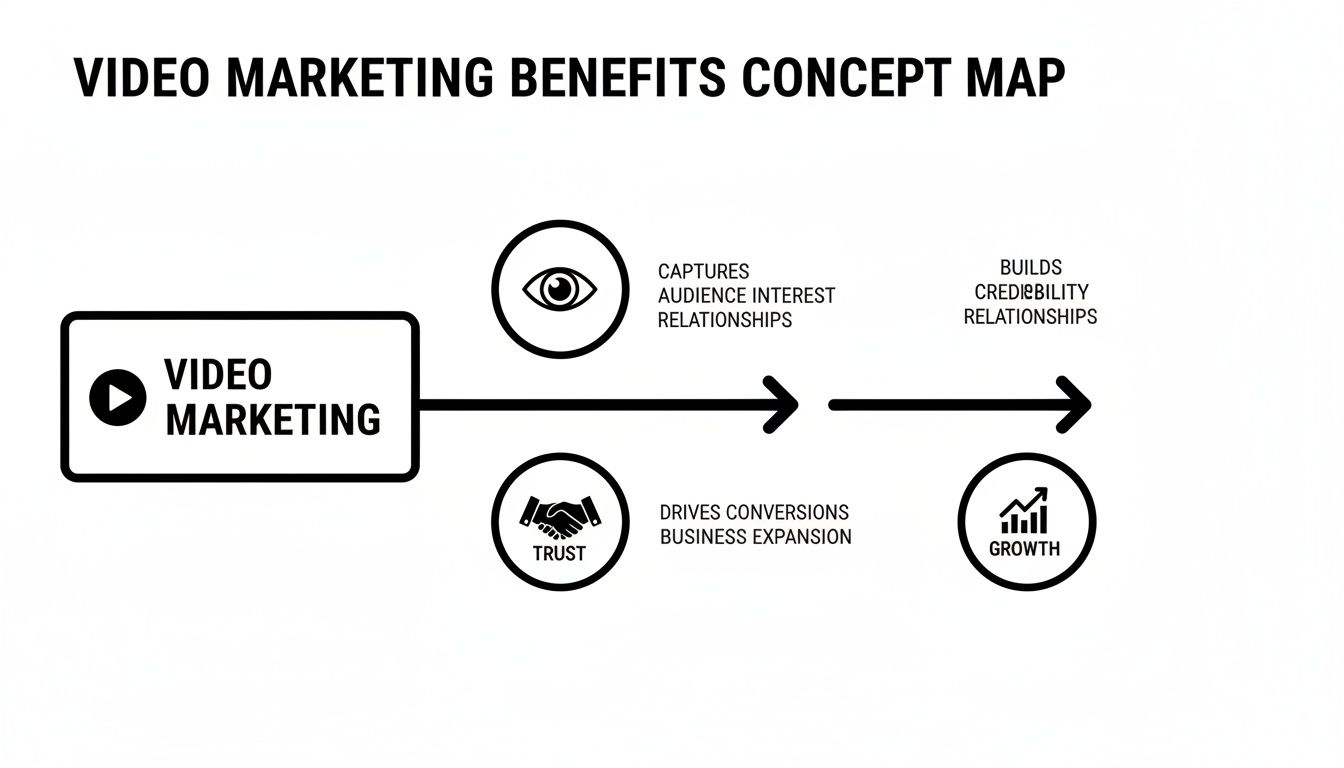
As you can see, video isn't just a one-off trick. It’s a tool you can use to guide people through the entire customer journey, from just hearing about you to becoming a loyal fan.
Match Your Videos to the Customer Journey
Okay, let's connect your goals and audience to the actual videos you should be making. I find it helpful to think about the customer relationship like a human one—it moves from a first date all the way to marriage. You wouldn't propose on a first date, right? In the same way, you shouldn't hit a brand new prospect with a hard-sell video right out of the gate.
Your video content should meet customers where they are. Start by offering value and building a connection, then guide them toward a deeper commitment with content that addresses their specific needs at each stage.
Let’s map this out using that relationship analogy:
1. The First Date (Awareness Stage)
Right now, your only job is to grab their attention and make a good first impression. Your content needs to be short, entertaining, and easy to share.
- Video Types: Quick social media clips, an engaging brand story, or even a funny, relatable TikTok.
- Real-World Example: A local bakery posts a 15-second time-lapse of their most popular croissant being made, set to a trending song on Instagram.
2. Getting Serious (Consideration Stage)
At this point, potential customers know you exist and are sizing you up against the competition. Your videos should educate them and build trust by showing off your expertise and the value you bring to the table.
- Video Types: Product demos, how-to tutorials, explainer videos, or a behind-the-scenes tour of your workshop.
- Real-World Example: A software company creates a two-minute video that shows exactly how its tool solves a common, frustrating problem for its target customer.
3. The Proposal (Decision Stage)
Your prospect is ready to pull the trigger. This is where you give them the social proof and final nudge of confidence they need to say "yes" and make a purchase.
- Video Types: Customer testimonials, detailed case studies, or even personalized video messages answering their final questions.
- Real-World Example: An e-commerce brand features a video of a real customer unboxing their product and sharing their genuine, excited reaction.
By lining up your videos with the customer journey, you make sure every piece of content has a purpose, moving viewers smoothly from casual observers to dedicated customers.
Your Modern Video Production Playbook
Let's get one thing straight: you don't need a Hollywood budget or a professional film crew to make great video. The tools and techniques available today have completely changed the game, putting high-quality video production squarely in the hands of every small business.
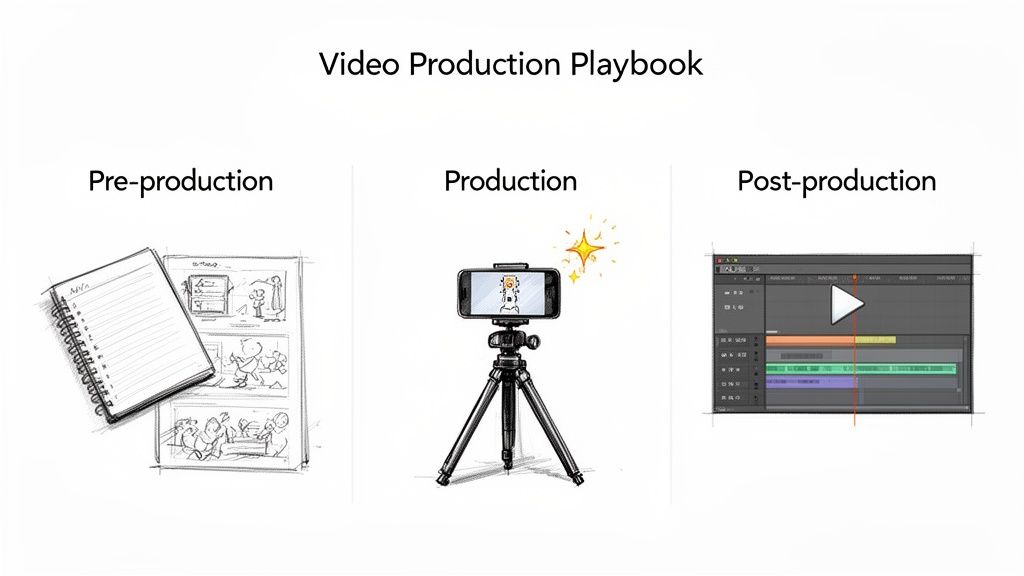
The whole process, which used to feel so intimidating, really just boils down to three manageable stages. Think of it like cooking a meal: you plan your recipe (pre-production), you gather and prep your ingredients (production), and then you cook and plate the final dish (post-production).
Let's walk through how this simple playbook works for your small business video marketing.
Stage 1: Pre-Production – Planning Your Story
This is, without a doubt, the most important part of the entire process. It’s also the one most people skip. Pre-production is where you map everything out before you ever press record or type a single prompt into an AI tool. It’s all about defining the ‘what’ and the ‘why’ so your final video actually hits its mark.
Before you go any further, just take a minute to answer these questions:
- What's the one thing you want people to remember? This is your core message.
- Who are you talking to? Your tone, visuals, and language all need to connect with this specific audience.
- What should they do next? Visit your site? Sign up for your newsletter? Make it crystal clear.
- What's the story? Even a 15-second social media clip needs a beginning, a middle, and an end to feel complete.
With those answers in hand, you can sketch out a quick script or even just a bullet-point outline. No need for a fancy screenplay—you just need a roadmap to keep you from getting lost. A little planning here saves a ton of headaches later.
Stage 2: Production – Capturing or Creating Your Visuals
Alright, this is the "action" phase where your ideas start to become real, tangible visuals. Traditionally, this meant pulling out a camera and filming. But now, you’ve got options—especially with AI video generation becoming so accessible.
The Traditional Route (Shooting Footage) You really don't need a bunch of expensive gear. A modern smartphone shoots incredible video, and good old-fashioned sunlight is often better than any fancy lighting kit. The two things that really make a difference are clear audio and a stable shot. A cheap tripod and an affordable lavalier mic will elevate your quality more than a camera that costs thousands.
The AI-Powered Route (Generating Footage) This is where things get really interesting for small businesses. Instead of filming anything yourself, you can now create custom video clips from a simple text description using platforms like Veemo AI.
Imagine you run an e-commerce store. Normally, launching a new running shoe would mean a complicated and expensive product shoot. But with AI, you can just type a prompt like, "a dynamic, cinematic shot of a new running shoe splashing through a puddle in slow motion," and get a professional-looking video ad in a matter of minutes.
This approach completely sidesteps the old barriers of cost, time, and technical skill. Suddenly, you have the creative power to produce visuals that, until recently, were only possible for brands with massive marketing departments.
Stage 3: Post-Production – Polishing Your Masterpiece
Once you have your raw ingredients—whether filmed by you or generated by an AI—it’s time for the final polish. Post-production is where you assemble all the pieces, add music, sprinkle in some text, and turn a folder of clips into a cohesive, compelling story.
This final stage involves a few key steps:
- Editing: Start trimming your clips. Cut out the fluff and keep the story moving. Modern editing tools are incredibly intuitive, and many have simple drag-and-drop interfaces that anyone can learn.
- Adding Audio: Pick some background music that fits the vibe of your video. If you're adding a voiceover, now's the time. Sound is a massive part of setting the emotional tone.
- Incorporating Graphics and Text: Add your logo, use text overlays to call out key points, and make sure you have a clear call-to-action at the end. Don't forget, 85% of videos on social media are watched with the sound off, so on-screen text and captions are absolutely crucial.
- Color Correction and Grading: This sounds technical, but it’s often just a matter of making small tweaks to brightness and color to ensure all your clips look consistent and professional.
By breaking it down into these three stages—planning, creating, and polishing—the entire video creation process becomes much less daunting. You can produce high-impact videos efficiently, no matter how small your budget or team.
How AI Can Supercharge Your Video Creation
Let’s be honest: for a long time, creating high-quality video was a huge pain for small businesses. It meant expensive cameras, complicated software, and way too much time. AI is changing that game completely. Think of it less like a robot taking over and more like a super-powered creative assistant that lives right on your laptop.
The old roadblocks—cost, complexity, and time—are starting to crumble. AI gives you the tools to produce polished, on-brand videos that can genuinely compete with what the big guys are putting out. You still bring the vision and the ideas; AI just helps you bring them to life in a fraction of the time.
From Simple Idea to Stunning Video
The most mind-blowing way AI is shaking up small business video marketing is with text-to-video generation. It’s exactly what it sounds like: you describe a scene using plain English, and the AI builds it for you. It’s like having an entire film crew and a Hollywood special effects team on standby, ready to create whatever you can imagine.
Say you run a local coffee shop and want to promote your new autumn latte. Instead of just snapping a quick photo, you could give an AI tool a prompt like this:
A cinematic close-up of a steaming pumpkin spice latte with a perfect swirl of cream. In the background, autumn leaves fall gently out of focus as warm morning light streams through a cozy cafe window.
In minutes, you get a professional-looking video clip that nails that exact cozy vibe you were going for. No camera, no lighting rig, no set design needed.
Here’s a peek at how a platform like Veemo AI makes this process feel simple and intuitive, even for total beginners.
The clean layout immediately shows you that turning a simple thought into a finished video is just a few clicks away.
Writing Prompts That Actually Work
Here’s the secret: the quality of the video you get out is directly tied to the quality of the prompt you put in. A vague prompt gets you a vague result. But a detailed, descriptive prompt? That’s where the magic happens. You have to start thinking like a film director.
Here’s a simple framework I use for writing prompts that deliver:
- Subject & Action: What’s the main thing in your shot, and what is it doing? (e.g., “A person unboxing a new smartphone…”)
- Scene & Setting: Paint a picture of the environment. Where are they? What’s around them? (e.g., “…on a clean, modern wooden desk.”)
- Style & Mood: What’s the vibe? Is it bright and airy? Dark and moody? Cinematic? Animated? (e.g., “Shot in a bright, minimalist style with soft, natural lighting…”)
- Shot Type & Angle: Tell the "camera" what to do. Is it a close-up? A wide shot? A drone view? (e.g., “…from a slow-motion, top-down angle.”)
When you put it all together, you get something much more powerful. You’re no longer asking for "a video of a shoe." You’re asking for "a dynamic side-profile shot of a futuristic running shoe, glowing with neon blue accents, as it sprints down a wet city street at night." See the difference?
AI Is More Than Just a One-Trick Pony
This technology isn't just for making slick promotional ads from scratch. It’s also incredibly powerful for breathing new life into content you already have, which can save you an enormous amount of time.
- Turn a Blog Post into an Explainer Video: Feed an article into an AI tool, and it can generate a script, create a lifelike AI avatar to narrate it, and produce a slick animated video.
- Animate Your Product Photos: Take a static image of your product and let AI turn it into a dynamic 360° demo. This gives customers a much better sense of what they’re buying.
- Create Endless Social Clips: Generate a whole series of short, on-brand video snippets for Instagram Reels or TikTok. You can maintain a perfectly consistent aesthetic without having to film the same thing over and over.
This approach to small business video marketing means that every single piece of content you own has the potential to become a compelling video. You can build a huge library of fresh, engaging assets without burning out your team or your budget.
Getting Your Videos Seen by the Right People
Creating a brilliant video is only half the battle. If your masterpiece just sits on your hard drive, it can’t actually do its job. Smart distribution is how you turn all that creative work into real business results, making sure your video lands in front of the people who matter most to your brand.
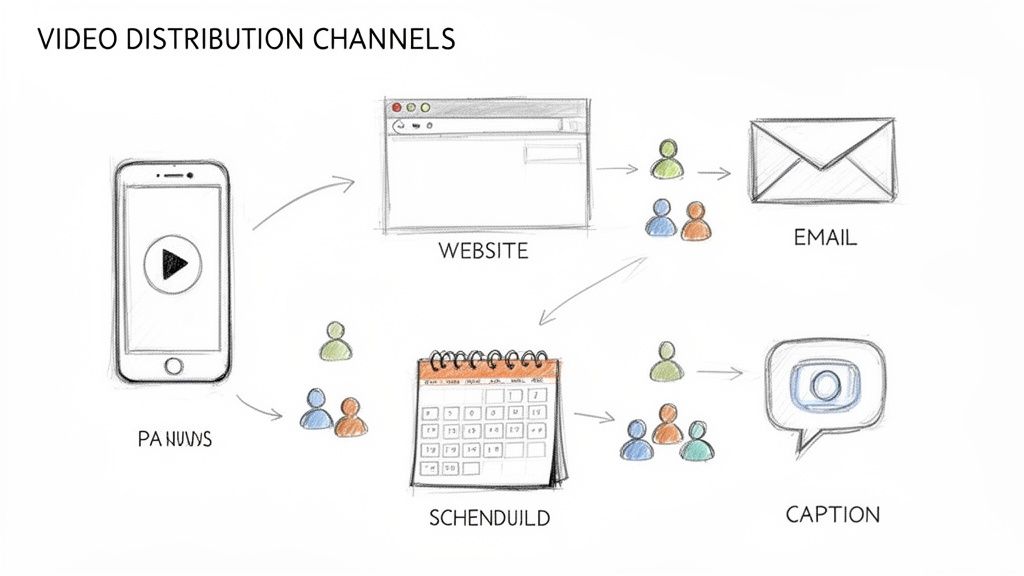
Think of it this way: your video is a powerful message, and your distribution channels are the delivery trucks. You have to pick the right trucks to get your message to the right neighborhoods. This means going beyond simply hitting "publish" and hoping for the best.
Choosing Your Core Video Channels
Here's the thing: not all platforms are created equal, and you don’t need to be everywhere at once. Spreading yourself too thin is a recipe for burnout. The key is to focus your efforts where your target audience is already hanging out. A solid small business video marketing plan always starts with a few core channels and expands from there.
For most small businesses, these are the most effective places to share video:
- Social Media Platforms: This is the obvious starting point. Channels like Instagram (especially Reels), TikTok, and Facebook are built for short, punchy videos that can reach new people fast. If you're a B2B business, LinkedIn is fantastic for sharing expertise and industry insights.
- Your Website: Think of your website as your digital storefront. Embedding videos on your homepage, product pages, or blog posts can make a huge difference in how long people stick around, which often translates to better conversion rates.
- Email Newsletters: Putting video in an email can seriously boost your click-through rates. A simple thumbnail that links out to your full video is a great way to re-engage your most loyal subscribers and guide them to a specific page or offer.
By concentrating on just a few key channels, you can really nail the content for each one instead of creating generic stuff for everywhere.
Tailoring Content for Each Platform
You wouldn't wear the same outfit to a beach party and a business meeting, right? The same logic applies to your videos. You can't just post the exact same file everywhere and expect it to work. Each platform has its own unwritten rules, formats, and audience expectations.
The most successful video marketers don't just post content; they adapt it. A small tweak in format, length, or captioning can be the difference between a video that gets ignored and one that gets shared.
To get the most out of every video you create, keep these best practices in mind:
Vertical Video Is Non-Negotiable
On mobile-first platforms like TikTok and Instagram Reels, you have to go vertical (a 9:16 aspect ratio). It fills the entire phone screen, creating a much more immersive experience for people who are endlessly scrolling.
Captions Are Crucial
Let's be real: a huge percentage of people watch social media videos with the sound off. If your video has someone talking, you absolutely need captions to make sure the message lands. It’s not just a nice-to-have; it's essential for getting your point across and makes your content accessible to everyone.
Write Compelling Descriptions and Titles
The text you write is just as important as the visuals. For a platform like YouTube, a keyword-rich title and description can massively improve your video's searchability. On social media, a hooky caption is what encourages people to comment and share.
The data backs up this focused, short-form approach. A full 21% of marketers say that short-form video delivers the best ROI, beating every other format. And it's not just marketers who think so; 71% of marketers and 63% of consumers agree that videos between 30 seconds and two minutes are the most effective for learning about a product. You can dig deeper into these video marketing statistics to see how they impact strategy.
Planning Your Posts with a Content Calendar
Consistency is what builds momentum online. A simple content calendar takes the stress out of posting by helping you plan ahead, ensuring you have a steady stream of content without that last-minute scramble.
Your calendar doesn't need to be fancy. A basic spreadsheet is all you need to get started.
| Week | Planned Video Content | Target Platform(s) | Key Message | Call to Action (CTA) |
|---|---|---|---|---|
| Week 1 | Behind-the-scenes tour of our workshop (30s) | Instagram Reels, TikTok | See the craftsmanship that goes into every product. | "Shop our new collection!" |
| Week 2 | Customer testimonial video (60s) | Website Homepage, Email | Hear why our customers love us. | "Read more reviews here." |
| Week 3 | Quick tip tutorial (45s) | Facebook, Instagram Stories | Solve a common problem with our product. | "Learn more on our blog." |
| Week 4 | Product demo of a new feature (90s) | YouTube, LinkedIn | Discover how our new update saves you time. | "Start your free trial today." |
A simple plan like this makes sure every video you create has a clear purpose, is set up for success on the right channel, and directly supports your bigger marketing goals.
Turning Video Data Into Smarter Decisions
So you’ve created some fantastic videos. That's a huge first step, but the real magic happens next. Success in video marketing isn’t just about getting views; it's about understanding what those views mean for your business and using that knowledge to get better results next time.
Think of your video analytics as a direct conversation with your audience. Every view, like, and share is a piece of feedback telling you what they love and what makes them tune out. By digging into the analytics tools on platforms like YouTube, Instagram, and Facebook, you can stop guessing and start making decisions based on real human behavior.
Key Video Marketing Metrics and What They Mean
It's easy to get overwhelmed by all the numbers. The trick is to focus on the metrics that actually connect to your goals. These are your Key Performance Indicators (KPIs), and they tell the true story of how your videos are performing.
Here’s a look at the most important video metrics for a small business and, more importantly, what they’re trying to tell you.
| Metric (KPI) | What It Measures | Actionable Insight |
|---|---|---|
| View-Through Rate (VTR) | The percentage of people who watched your video all the way to the end. | A low VTR is a red flag. It could mean your intro is boring or the video is just too long. Try to hook viewers in the first 3-5 seconds. |
| Click-Through Rate (CTR) | The percentage of viewers who clicked on your call-to-action (CTA), like a link to your website. | If your CTR is low, your CTA might be weak, confusing, or buried. Make it impossible to miss and tell people exactly what you want them to do. |
| Conversion Rate | The percentage of viewers who took a specific action after clicking (like signing up or buying something). | Getting clicks but no conversions? The problem might be your landing page. Make sure the page delivers on the promise you made in the video. |
| Audience Retention | A graph showing the exact moments where viewers are dropping off. | Pay close attention to the big dips. Those are the boring parts. This data is gold for editing future videos and cutting out the fluff. |
Focusing on these KPIs helps you see beyond vanity metrics and understand the real impact your videos are having on your business goals.
From Data to Action: Making Your Next Video Better
Data is just a pile of numbers until you use it to make a change. For example, if you see that your audience retention on Instagram Reels craters after the 15-second mark, that’s your audience telling you to get to the point much faster.
Don't treat analytics as a report card. Instead, view it as a roadmap. The data doesn't just tell you what happened; it shows you exactly where to go next to improve your results.
Let's say a product demo video has an awesome view-through rate, but almost no one clicks the link to the product page. The video itself is clearly working—it’s engaging! The breakdown is happening at the final step. Maybe the call-to-action is weak. You could try changing the text from a passive "Learn More" to a more direct "Shop Now" and see if that little tweak makes a difference.
This is the cycle: measure, learn, and adjust. It’s this simple, repeatable process that turns your video efforts from just "making content" into a powerful engine for business growth.
Got Questions About Video Marketing? We've Got Answers.
Jumping into video for the first time can feel a little overwhelming. That's totally normal. Most small business owners I talk to have the same handful of practical questions, so let’s tackle them head-on. My goal is to give you the clear, straightforward answers you need to start making videos with confidence.
What’s a Realistic Video Budget for a Small Business?
This is the best part about video today: you can get started with virtually any budget. You absolutely do not need a Hollywood-level production fund.
- The Scrappy DIY Start (Under $100): Honestly, your smartphone is powerful enough. If you have a bit of cash to spare, a small tripod ($25) and a clip-on lavalier microphone ($25) will make a world of difference. That simple investment dramatically improves stability and sound quality, instantly making you look more professional.
- The Smart AI-Powered Route ($50-$200/month): This is where things get really interesting. A subscription to an AI video generator gives you incredible bang for your buck. You can create everything from slick, cinematic ads to animated explainers and social media clips just by typing, which saves a ton of time you'd otherwise spend filming and editing.
- Hiring a Pro ($500+ per video): For those really important projects—think a polished welcome video for your website or a big product launch—bringing in a freelance videographer is a smart move.
My advice? Start small. Prove to yourself that it works, see what resonates with your audience, and then scale your budget as the results start rolling in.
Don’t let a tight budget stop you. These days, creativity and consistency trump expensive gear every time. In fact, authentic, lo-fi videos often outperform slick, big-budget productions.
What Are the Easiest Videos to Make Right Now?
When you're just getting your feet wet, forget about complex scripts and fancy editing. The key is to focus on simple formats that deliver real value.
Here are a few ideas that are perfect for beginners:
- Simple Q&A Videos: Pick one—just one!—common customer question. Set up your phone, look at the camera, and answer it like you’re talking to a friend.
- Behind-the-Scenes Glimpses: People are curious! Show them your workspace, your team in action, or a quick peek at how your product comes to life. It’s a fantastic way to build a human connection.
- Quick Tip Videos: Share a single, super-useful tip related to what you do. These short, punchy videos are gold on platforms like Instagram Reels or TikTok because they're valuable and easily shareable.
How Long Should My Videos Actually Be?
There's no magic number here. The right video length depends entirely on where you're posting it and what you're trying to achieve. The goal is to match your video's duration to what people on that platform expect.
Here’s a quick cheat sheet:
| Platform | Recommended Length | Why It Works |
|---|---|---|
| TikTok & Instagram Reels | 15-60 seconds | These platforms are built for fast-paced scrolling. You need to grab attention in the first three seconds. |
| Facebook & LinkedIn | 1-3 minutes | Great for sharing a quick story, offering a solid piece of advice, or demonstrating a product feature. |
| YouTube | 2-10 minutes | People come here for deeper dives. This is your spot for tutorials, detailed explainers, or interviews. |
A good rule of thumb? Be as long as you need to be to deliver value, but as short as you possibly can to keep their attention.
Ready to make incredible videos without the steep learning curve or high costs? Veemo AI lets you generate cinematic ads, product demos, and social clips from simple text. Start creating with Veemo AI today and watch your ideas come to life in minutes.